

AI Integration Quick Reference
AI Integration Quick Reference
Prerequisites
Get your credentials from the CometChat Dashboard:
- Create a new app
- Head over to the API & Auth Keys section and note the Auth Key, App ID & Region
Installation
Add the following dependency to yourpubspec.yaml file and run pub get:
- Dart
iOS Setup
- Add the following to your Podfile inside the iOS section of your app:
- Ruby
- Change the deployment target to
11or higher. - Navigate to your iOS folder in terminal and run
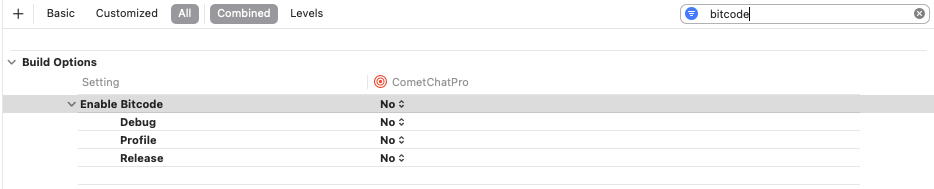
pod install. For Apple Silicon systems, use a Rosetta terminal. - Set Enabled Bitcode to NO in the Build Settings of your Xcode project.
Import the SDK
- Dart
Initialization
Theinit() method initializes the SDK and must be called before any other CometChat method. Call it once at app startup, typically in your root widget’s initState() or main() function.
- Dart
APP_ID and APP_REGION with your credentials from the Dashboard.
Parameters
AppSettings Options
Presence Subscription
Choose how to subscribe to user presence (online/offline status):Response
Response
On Success — A
String message confirming SDK initialization:Error
Error
WebSocket Connection
By default, the SDK manages WebSocket connections automatically. To manage them manually:Next Steps
Authentication
Log in users with Auth Key or Auth Token
Send Messages
Send your first message