

AI Integration Quick Reference
AI Integration Quick Reference
CometChatNotificationFeedComponent displays a scrollable notification feed where each item is rendered as a card using @cometchat/cards-angular. It handles fetching, pagination, category filtering, timestamp grouping, real-time updates, and read/delivered/engagement reporting automatically.
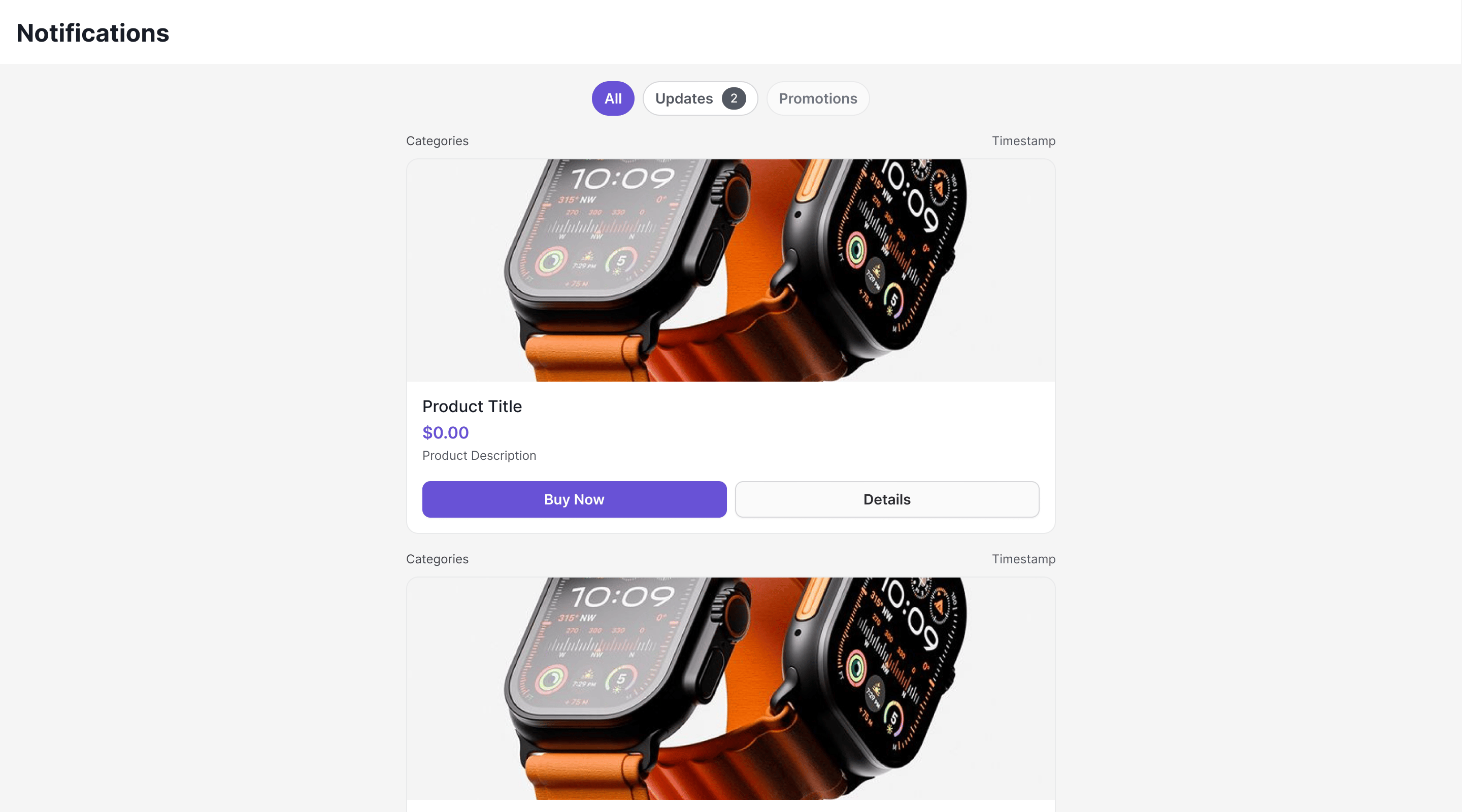
Where It Fits
CometChatNotificationFeedComponent is a full-screen, standalone component. Drop it into a page or route. It manages its own data fetching, state, and real-time listeners — you just handle the navigation outputs.
Minimal Render
CometChatUIKit.init() and a user logged in.
Root CSS class: .cometchat-notification-feed
Filtering Feed Items
Control what loads using a custom request builder:Filter Options
Actions and Events
Outputs
itemClick
Fires when a feed item card is clicked. Emits theNotificationFeedItem.
actionClick
Fires when an interactive element (button, link) inside a card is clicked. Emits{ item, action }, where action contains the action type, parameters, and the element ID that triggered it.
error
Fires when an internal error occurs (network failure, SDK exception). Emits aCometChat.CometChatException.
backClick
Fires when the back button in the header is clicked. Emitsvoid.
Automatic Behaviors
The component handles these automatically — no manual setup needed:Customization
Template Slots
Replace individual regions with your ownng-template. Bind the template reference to the matching input:
Style Input
Pass aCometChatNotificationFeedStyle object to override colors, fonts, and dimensions without writing CSS:
CSS Styling
Override design tokens on the component selector:CSS Classes
Inputs
All inputs are optional.Outputs
The
CardAction object contains:
type— Action type (e.g.,"openUrl","chatWithUser")params— Action parameters (e.g.,{ url: "..." },{ uid: "..." })elementId— ID of the element that triggered the actioncardJson— The raw card JSON the action originated from
Common Patterns
Show only unread items
Hide filter chips and header
Embed in a sidebar
Deep link to a specific notification
Next Steps
Campaigns Feature
Overview of how campaigns work end-to-end
SDK Campaigns API
Low-level SDK APIs for feed items, categories, and engagement
Theming
Customize colors, fonts, and appearance
Components
Browse all prebuilt UI components