

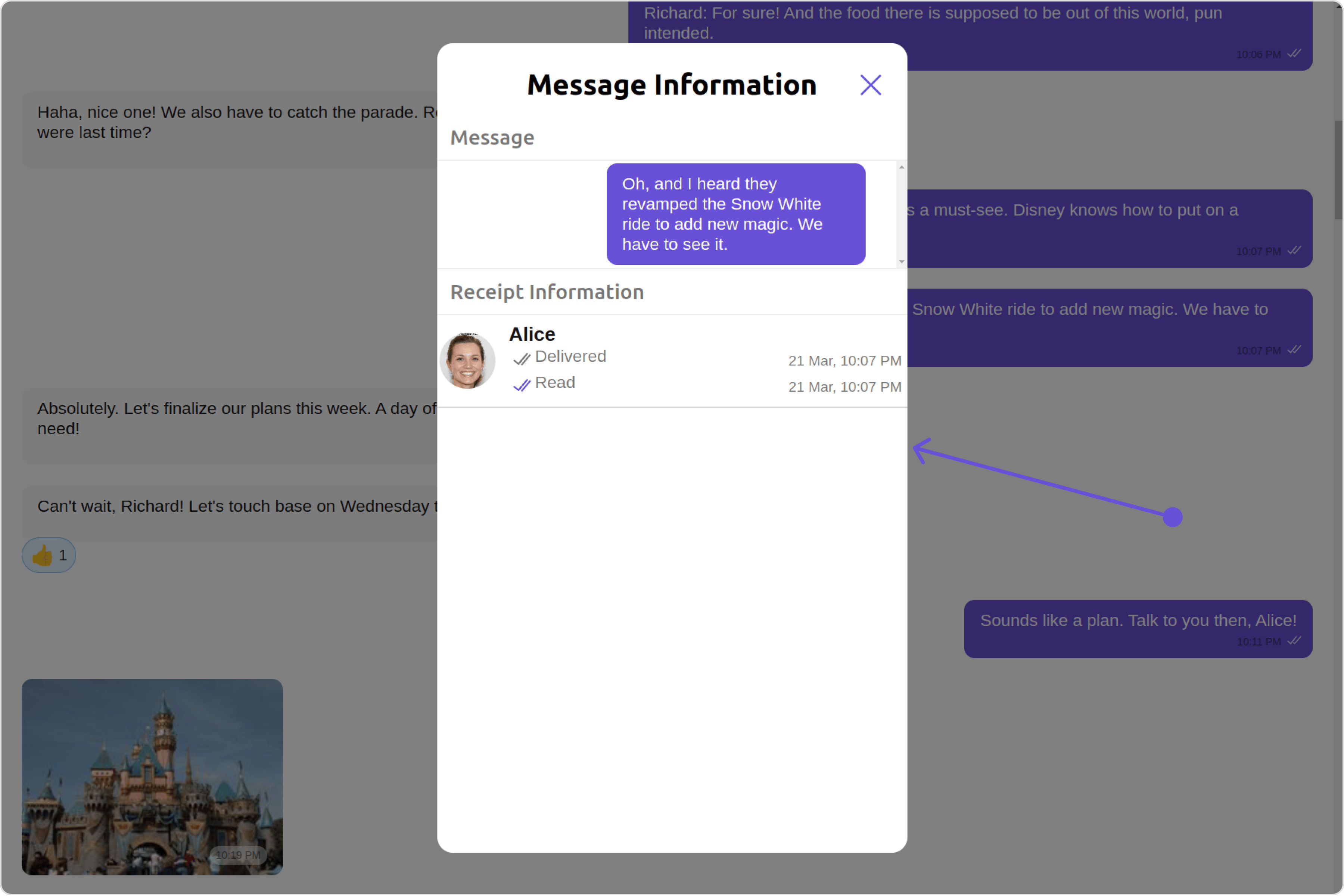
| Base Components | Description |
|---|---|
| List Item | This renders common components used across Conversations, Groups & Users. |
Usage
Integration
The following code snippet illustrates how you can directly incorporate the Message Information component into your Application.- app.module.ts
- app.component.ts
- app.component.html
import { CUSTOM_ELEMENTS_SCHEMA, NgModule } from '@angular/core';
import { BrowserModule } from '@angular/platform-browser';
import { CometChatMessageInformation } from '@cometchat/chat-uikit-angular';
import { AppComponent } from './app.component';

@NgModule({
  imports: [
    BrowserModule,
    CometChatMessageInformation
  ],
  declarations: [AppComponent],
  providers: [],
  bootstrap: [AppComponent],
  schemas: [CUSTOM_ELEMENTS_SCHEMA]
})
export class AppModule { }
import { CometChat } from '@cometchat/chat-sdk-javascript';
import { Component, OnInit } from '@angular/core';
import {  CometChatThemeService, CometChatUIKit, ListItemStyle } from '@cometchat/chat-uikit-angular';
import "@cometchat/uikit-elements";

@Component({
  selector: 'app-root',
  templateUrl: './app.component.html',
  styleUrls: ['./app.component.css']
})
export class AppComponent implements OnInit{
  ngOnInit(): void {
    CometChat.getMessageDetails(messageId).then((message) => {
      if (message instanceof CometChat.TextMessage) {
        this.messageObject = message;
        this.textMessageContent = this.messageObject.getText();
      }
    }).catch((error) => {
      console.error('Error fetching message details:', error);
      this.textMessageContent = '';
    });
  }

  public messageObject!: CometChat.TextMessage;
  public textMessageContent: string | undefined;

  constructor(private themeService:CometChatThemeService) {
    themeService.theme.palette.setMode("light")
    themeService.theme.palette.setPrimary({ light: "#6851D6", dark: "#6851D6" })
  }
  listItemStyle: ListItemStyle = new ListItemStyle({
    background: "transparent",
    padding:"5px",
    border:"1px solid #e9b8f5",
    titleColor:"#8830f2",
    borderRadius:"20px",
    width:"100% !important"
  });

  onLogin(UID?: any) {
    CometChatUIKit.login({ uid: UID }).then(
      (user) => {
        setTimeout(() => {
          window.location.reload();
        }, 1000);
      },
      (error) => {
        console.log("Login failed with exception:", { error });
      }
    );
  }
}
<cometchat-message-information
*ngIf="messageObject"
[message]="messageObject"
[bubbleView]="bubbleViewTemplate"
></cometchat-message-information>
</div>

<ng-template #bubbleViewTemplate>
  <div>
    <cometchat-list-item
    [title]="textMessageContent"
    [listItemStyle]="listItemStyle"
    ></cometchat-list-item>
    </div>
</ng-template>
Actions
Actions dictate how a component functions. They are divided into two types: Predefined and User-defined. You can override either type, allowing you to tailor the behavior of the component to fit your specific needs.1. onClose
TheonClose event is typically triggered when the close button is clicked and it carries a default action. However, with the following code snippet, you can effortlessly override this default operation.
- app.component.ts
- app.component.html
import { CometChat } from '@cometchat/chat-sdk-javascript';
import { Component, OnInit } from '@angular/core';
import {  CometChatThemeService, CometChatUIKit, ListItemStyle } from '@cometchat/chat-uikit-angular';
import "@cometchat/uikit-elements";

@Component({
  selector: 'app-root',
  templateUrl: './app.component.html',
  styleUrls: ['./app.component.css']
})
export class AppComponent implements OnInit{
  ngOnInit(): void {
    CometChat.getMessageDetails(messageId).then((message) => {
      if (message instanceof CometChat.TextMessage) {
        this.messageObject = message;
        this.textMessageContent = this.messageObject.getText();
      }
    }).catch((error) => {
      console.error('Error fetching message details:', error);
      this.textMessageContent = '';
    });
  }

  public messageObject!: CometChat.TextMessage;
  public textMessageContent: string | undefined;
  public handleOnClose = () => {
    console.log("Your custom on close actions");
  }
  constructor(private themeService:CometChatThemeService) {
    themeService.theme.palette.setMode("light")
    themeService.theme.palette.setPrimary({ light: "#6851D6", dark: "#6851D6" })
  }
  listItemStyle: ListItemStyle = new ListItemStyle({
    background: "transparent",
    padding:"5px",
    border:"1px solid #e9b8f5",
    titleColor:"#8830f2",
    borderRadius:"20px",
    width:"100% !important"
  });

  onLogin(UID?: any) {
    CometChatUIKit.login({ uid: UID }).then(
      (user) => {
        setTimeout(() => {
          window.location.reload();
        }, 1000);
      },
      (error) => {
        console.log("Login failed with exception:", { error });
      }
    );
  }
}
<cometchat-message-information
*ngIf="messageObject"
[message]="messageObject"
[bubbleView]="bubbleViewTemplate"
[onClose]="handleOnClose"
></cometchat-message-information>
</div>

<ng-template #bubbleViewTemplate>
  <div>
    <cometchat-list-item
    [title]="textMessageContent"
    [listItemStyle]="listItemStyle"
    ></cometchat-list-item>
    </div>
</ng-template>
2. onError
This action doesn’t change the behavior of the component but rather listens for any errors that occur in the MessageInformation component.- app.component.ts
- app.component.html
import { CometChat } from '@cometchat/chat-sdk-javascript';
import { Component, OnInit } from '@angular/core';
import {  CometChatThemeService, CometChatUIKit, ListItemStyle } from '@cometchat/chat-uikit-angular';
import "@cometchat/uikit-elements";

@Component({
  selector: 'app-root',
  templateUrl: './app.component.html',
  styleUrls: ['./app.component.css']
})
export class AppComponent implements OnInit{
  ngOnInit(): void {
    CometChat.getMessageDetails(messageId).then((message) => {
      if (message instanceof CometChat.TextMessage) {
        this.messageObject = message;
        this.textMessageContent = this.messageObject.getText();
      }
    }).catch((error) => {
      console.error('Error fetching message details:', error);
      this.textMessageContent = '';
    });
  }

  public messageObject!: CometChat.TextMessage;
  public textMessageContent: string | undefined;
  public handleOnError = (error: CometChat.CometChatException) => {
    console.log("your custom on error action", error);
  };
  constructor(private themeService:CometChatThemeService) {
    themeService.theme.palette.setMode("light")
    themeService.theme.palette.setPrimary({ light: "#6851D6", dark: "#6851D6" })
  }
  listItemStyle: ListItemStyle = new ListItemStyle({
    background: "transparent",
    padding:"5px",
    border:"1px solid #e9b8f5",
    titleColor:"#8830f2",
    borderRadius:"20px",
    width:"100% !important"
  });

  onLogin(UID?: any) {
    CometChatUIKit.login({ uid: UID }).then(
      (user) => {
        setTimeout(() => {
          window.location.reload();
        }, 1000);
      },
      (error) => {
        console.log("Login failed with exception:", { error });
      }
    );
  }
}
<cometchat-message-information
*ngIf="messageObject"
[message]="messageObject"
[bubbleView]="bubbleViewTemplate"
[onError]="handleOnError"
></cometchat-message-information>
</div>

<ng-template #bubbleViewTemplate>
  <div>
    <cometchat-list-item
    [title]="textMessageContent"
    [listItemStyle]="listItemStyle"
    ></cometchat-list-item>
    </div>
</ng-template>
Filters
MessageInformation component does not have any available filters.Events
MessageInformation component does not have any available events.Customization
To fit your app’s design requirements, you can customize the appearance of the MessageInformation component. We provide exposed methods that allow you to modify the experience and behavior according to your specific needs.Style
Using Style you can customize the look and feel of the component in your app, These parameters typically control elements such as the color, size, shape, and fonts used within the component.1. MessageInformationStyle
To modify the styling, you can apply the MessageInformationStyle to the MessageInformation Component using themessageInformationStyle property.
- app.component.ts
- app.component.html
import { CometChat } from '@cometchat/chat-sdk-javascript';
import { Component, OnInit } from '@angular/core';
import {  CometChatThemeService, CometChatUIKit, ListItemStyle } from '@cometchat/chat-uikit-angular';
import { MessageInformationStyle } from '@cometchat/uikit-shared';
import "@cometchat/uikit-elements";

@Component({
  selector: 'app-root',
  templateUrl: './app.component.html',
  styleUrls: ['./app.component.css']
})
export class AppComponent implements OnInit{
  ngOnInit(): void {
    CometChat.getMessageDetails(messageId).then((message) => {
      if (message instanceof CometChat.TextMessage) {
        this.messageObject = message;
        this.textMessageContent = this.messageObject.getText();
      }
    }).catch((error) => {
      console.error('Error fetching message details:', error);
      this.textMessageContent = '';
    });
  }

  public messageObject!: CometChat.TextMessage;
  public textMessageContent: string | undefined;
  constructor(private themeService:CometChatThemeService) {
    themeService.theme.palette.setMode("light")
    themeService.theme.palette.setPrimary({ light: "#6851D6", dark: "#6851D6" })
  }
  listItemStyle: ListItemStyle = new ListItemStyle({
    background: "transparent",
    padding:"5px",
    border:"1px solid #e9b8f5",
    titleColor:"#8830f2",
    borderRadius:"20px",
    width:"100% !important"
  });
   messageInformationStyle = new MessageInformationStyle({
    background:'#ffffff',
    border:'2px solid #faf5ff',
    borderRadius:'10px',
    height:'500px',
    width:'400px',
    captionTextColor:"#630bba"
  });

  onLogin(UID?: any) {
    CometChatUIKit.login({ uid: UID }).then(
      (user) => {
        setTimeout(() => {
          window.location.reload();
        }, 1000);
      },
      (error) => {
        console.log("Login failed with exception:", { error });
      }
    );
  }
}
<cometchat-message-information
*ngIf="messageObject"
[message]="messageObject"
[bubbleView]="bubbleViewTemplate"
[messageInformationStyle]="messageInformationStyle"
></cometchat-message-information>
</div>

<ng-template #bubbleViewTemplate>
  <div>
    <cometchat-list-item
    [title]="textMessageContent"
    [listItemStyle]="listItemStyle"
    ></cometchat-list-item>
    </div>
</ng-template>
| Property | Description | Code |
|---|---|---|
| titleTextFont | Sets the font for the title | titleTextFont?: string; |
| titleTextColor | Sets the font for the title | titleTextColor?: string; |
| subtitleTextColor | Sets the text color for the subtitle | subtitleTextColor?: string; |
| subtitleTextFont | Sets the text font for the subtitle | subtitleTextFont?: string; |
| emptyStateTextColor | Sets the color for the empty state text | emptyStateTextColor?: string; |
| emptyStateTextFont | Sets the font for the empty state text | emptyStateTextFont?: string; |
| errorStateTextFont | Sets the text font for the error state text | errorStateTextFont?: string; |
| errorStateTextColor | Sets the text font for the error state text | errorStateTextColor |
| captionTextFont | Sets the text font for the caption | captionTextFont?: string; |
| captionTextColor | Sets the text color for the caption | captionTextColor?: string; |
| sendIconTint | Sets the icon color for the send Icon | sendIconTint?: string; |
| loadingIconTint | Sets the icon color for the loading Icon | loadingIconTint?: string; |
| readIconTint | Sets the icon color for the read Icon | readIconTint?: string; |
| deliveredIconTint | Sets the icon color for the delivered Icon | deliveredIconTint?: string; |
| dividerTint | Sets the icon color for the separator | dividerTint?: string; |
| border | Used to set border | border?: string, |
| borderRadius | Used to set border radius | borderRadius?: string; |
| background | Used to set background colour | background?: string; |
| height | Used to set height | height?: string; |
| width | Used to set width | width?: string; |
2. ListItemStyle
To apply customized styles to theList Item component in the MessageInformation Component, you can use the following code snippet. For further insights on List Item Styles refer
- app.component.ts
- app.component.html
import { CometChat } from '@cometchat/chat-sdk-javascript';
import { Component, OnInit } from '@angular/core';
import {  CometChatThemeService, CometChatUIKit, ListItemStyle } from '@cometchat/chat-uikit-angular';
import "@cometchat/uikit-elements";

@Component({
  selector: 'app-root',
  templateUrl: './app.component.html',
  styleUrls: ['./app.component.css']
})
export class AppComponent implements OnInit{
  ngOnInit(): void {
    CometChat.getMessageDetails(messageId).then((message) => {
      if (message instanceof CometChat.TextMessage) {
        this.messageObject = message;
        this.textMessageContent = this.messageObject.getText();
      }
    }).catch((error) => {
      console.error('Error fetching message details:', error);
      this.textMessageContent = '';
    });
  }

  public messageObject!: CometChat.TextMessage;
  public textMessageContent: string | undefined;
  constructor(private themeService:CometChatThemeService) {
    themeService.theme.palette.setMode("light")
    themeService.theme.palette.setPrimary({ light: "#6851D6", dark: "#6851D6" })
  }
  listItemStyle: ListItemStyle = new ListItemStyle({
    background: "transparent",
    padding:"5px",
    border:"1px solid #e9b8f5",
    titleColor:"#8830f2",
    borderRadius:"20px",
    width:"100% !important"
  });

  onLogin(UID?: any) {
    CometChatUIKit.login({ uid: UID }).then(
      (user) => {
        setTimeout(() => {
          window.location.reload();
        }, 1000);
      },
      (error) => {
        console.log("Login failed with exception:", { error });
      }
    );
  }
}
<cometchat-message-information
*ngIf="messageObject"
[message]="messageObject"
[bubbleView]="bubbleViewTemplate"
[listItemStyle]="listItemStyle"
></cometchat-message-information>
</div>

<ng-template #bubbleViewTemplate>
  <div>
    <cometchat-list-item
    [title]="textMessageContent"
    [listItemStyle]="listItemStyle"
    ></cometchat-list-item>
    </div>
</ng-template>
Functionality
These are a set of small functional customizations that allow you to fine-tune the overall experience of the component. With these, you can change text, set custom icons, and toggle the visibility of UI elements.- app.component.ts
- app.component.html
import { CometChat } from '@cometchat/chat-sdk-javascript';
import { Component, OnInit } from '@angular/core';
import {  CometChatThemeService, CometChatUIKit, ListItemStyle } from '@cometchat/chat-uikit-angular';
import "@cometchat/uikit-elements";

@Component({
  selector: 'app-root',
  templateUrl: './app.component.html',
  styleUrls: ['./app.component.css']
})
export class AppComponent implements OnInit{
  ngOnInit(): void {
    CometChat.getMessageDetails(messageId).then((message) => {
      if (message instanceof CometChat.TextMessage) {
        this.messageObject = message;
        this.textMessageContent = this.messageObject.getText();
      }
    }).catch((error) => {
      console.error('Error fetching message details:', error);
      this.textMessageContent = '';
    });
  }

  public messageObject!: CometChat.TextMessage;
  public textMessageContent: string | undefined;
  title='Custom Title';
  CloseICon='your custom close icon';

  constructor(private themeService:CometChatThemeService) {
    themeService.theme.palette.setMode("light")
    themeService.theme.palette.setPrimary({ light: "#6851D6", dark: "#6851D6" })
  }
  listItemStyle: ListItemStyle = new ListItemStyle({
    background: "transparent",
    padding:"5px",
    border:"1px solid #e9b8f5",
    titleColor:"#8830f2",
    borderRadius:"20px",
    width:"100% !important"
  });

  onLogin(UID?: any) {
    CometChatUIKit.login({ uid: UID }).then(
      (user) => {
        setTimeout(() => {
          window.location.reload();
        }, 1000);
      },
      (error) => {
        console.log("Login failed with exception:", { error });
      }
    );
  }
}
<cometchat-message-information
*ngIf="messageObject"
[message]="messageObject"
[bubbleView]="bubbleViewTemplate"
[title]="title"
[closeIconURL]="CloseICon"
></cometchat-message-information>
</div>

<ng-template #bubbleViewTemplate>
  <div>
    <cometchat-list-item
    [title]="textMessageContent"
    [listItemStyle]="listItemStyle"
    ></cometchat-list-item>
    </div>
</ng-template>
| Property | Description | Code |
|---|---|---|
| message | Sets the message to be displayed in the message information view. | [message]="messageObject" |
| errorStateView | used to show the error state view in case of an error occurred | [errorStateView]="getErrorStateView" |
| deliveredIcon | It is used to pass user defined image in to the MessageReceipt, to change the icon When Message is delivered. | deliveredIcon='your custom delivered icon' |
| readIcon | It is used to pass user defined image in to the MessageReceipt, to change the icon When Message is read. | readIcon='your custom read icon' |
| receiptDatePattern | used to set the date pattern for delivered and read date time | [receiptDatePattern]="getReceiptDatePattern" |
| emptyStateText | used to set a custom text response when fetching the users has returned an empty list | emptyStateText='custom empty state text' |
How to integrate CometChatMesssageInformation ?
SinceCometChatMesssageInformation is a component, it can be added directly to your application.
- app.module.ts
- app.component.ts
- app.component.html
import { CUSTOM_ELEMENTS_SCHEMA, NgModule } from '@angular/core';
import { BrowserModule } from '@angular/platform-browser';
import { CometChatMessageInformation } from '@cometchat/chat-uikit-angular';
import { AppComponent } from './app.component';

@NgModule({
  imports: [
    BrowserModule,
    CometChatMessageInformation
  ],
  declarations: [AppComponent],
  providers: [],
  bootstrap: [AppComponent],
  schemas: [CUSTOM_ELEMENTS_SCHEMA]
})
export class AppModule { }
import { CometChat } from '@cometchat/chat-sdk-javascript';
import { Component, OnInit } from '@angular/core';
import {  CometChatThemeService, CometChatUIKit, ListItemStyle } from '@cometchat/chat-uikit-angular';
import "@cometchat/uikit-elements";

@Component({
  selector: 'app-root',
  templateUrl: './app.component.html',
  styleUrls: ['./app.component.css']
})
export class AppComponent implements OnInit{
  ngOnInit(): void {
    CometChat.getMessageDetails(messageId).then((message) => {
      if (message instanceof CometChat.TextMessage) {
        this.messageObject = message;
        this.textMessageContent = this.messageObject.getText();
      }
    }).catch((error) => {
      console.error('Error fetching message details:', error);
      this.textMessageContent = '';
    });
  }

  public messageObject!: CometChat.TextMessage;
  public textMessageContent: string | undefined;

  constructor(private themeService:CometChatThemeService) {
    themeService.theme.palette.setMode("light")
    themeService.theme.palette.setPrimary({ light: "#6851D6", dark: "#6851D6" })
  }
  listItemStyle: ListItemStyle = new ListItemStyle({
    background: "transparent",
    padding:"5px",
    border:"1px solid #e9b8f5",
    titleColor:"#8830f2",
    borderRadius:"20px",
    width:"100% !important"
  });

  onLogin(UID?: any) {
    CometChatUIKit.login({ uid: UID }).then(
      (user) => {
        setTimeout(() => {
          window.location.reload();
        }, 1000);
      },
      (error) => {
        console.log("Login failed with exception:", { error });
      }
    );
  }
}
<cometchat-message-information
*ngIf="messageObject"
[message]="messageObject"
[bubbleView]="bubbleViewTemplate"
></cometchat-message-information>
</div>

<ng-template #bubbleViewTemplate>
  <div>
    <cometchat-list-item
    [title]="textMessageContent"
    [listItemStyle]="listItemStyle"
    ></cometchat-list-item>
    </div>
</ng-template>
Properties
| property | type | Description |
|---|---|---|
| template | CometChatMessageTemplate | Sets a custom message template for the message information view. |
| message | BaseMessage | Sets the message to be displayed in the message information view. |
| title | String | Sets the title that will be displayed at the top of the message information. |
| listItemView | TemplateRef<any> | Sets a custom list item view for individual entries in the message information view. |
| subtitleView | TemplateRef<any> | Sets a custom subtitle view for individual entries in the message information view. |
| receiptDatePattern | ((timestamp: number) => string) | Sets a custom date pattern for formatting receipt dates in the message information view. |
| messageInformationStyle | MessageInformationStyle | Sets the overall style and appearance for the message information view. |
| readIcon | string | Sets the custom icon resource for read receipts in the message information view. |
| deliveredIcon | string | Sets the custom icon resource for delivered receipts in the message information view. |
| listItemStyle | ListItemStyle | Sets the style for list items in the message information view. |
| onError | ((error: CometChatException) => void) | Sets the error callback to handle any errors that may occur within the message information view. |
| emptyStateText | String | Sets the text to be displayed in the empty state view of the message information view. |
| errorStateText | String | Sets the error message to be displayed in the error state view of the message information view. |
| emptyStateView | TemplateRef<any> | Sets the custom layout resource for the empty state view of the message information view. |
| errorStateView | TemplateRef<any> | Sets the custom layout resource for the error state view of the message information view. |
| loadingStateView | TemplateRef<any> | Sets the custom layout resource for the loading state view of the message information view. |