

AI Integration Quick Reference
AI Integration Quick Reference
Overview
TheShortCutFormatter class extends the CometChatTextFormatter class to provide a mechanism for handling shortcuts within messages. This guide walks you through the process of using ShortCutFormatter to implement shortcut extensions in your CometChat application.
The Message Shortcuts extension must be enabled in your CometChat Dashboard for this feature to work.
Setup
1
Create the ShortCutFormatter Class
Define the ShortCutFormatter class by extending the CometChatTextFormatter class:
- TypeScript
- JavaScript
2
Override the search() Method
Override the
search() method to fetch shortcuts based on the entered search text:- TypeScript
- JavaScript
Usage
Initialize an instance ofShortCutFormatter and pass it to the message composer via the textFormatters prop:
- TypeScript
- JavaScript
Result
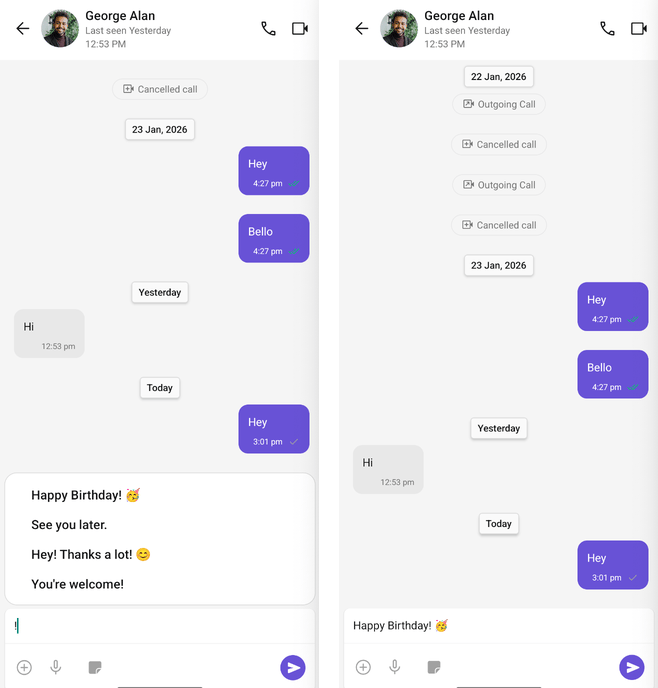
When users type the trigger character (!), they’ll see a list of available shortcuts to quickly insert predefined text.
Next Steps
Mentions Formatter
Format and style @mentions in chat messages
Message Composer
Customize the message input component
All Guides
Browse all feature and formatter guides
Message List
Customize how messages are displayed