

AI Integration Quick Reference
AI Integration Quick Reference
{
"component": "CometChatConversations",
"package": "com.cometchat.chatuikit.conversations",
"xmlElement": "<com.cometchat.chatuikit.conversations.CometChatConversations />",
"description": "Scrollable list of recent one-on-one and group conversations for the logged-in user.",
"primaryOutput": {
"method": "setOnItemClick",
"type": "OnItemClick<Conversation>"
},
"methods": {
"data": {
"setConversationsRequestBuilder": {
"type": "ConversationsRequest.ConversationsRequestBuilder",
"default": "SDK default (30 per page)",
"note": "Pass the builder, not the result of .build()"
},
"setDateTimeFormatter": {
"type": "DateTimeFormatterCallback",
"default": "Component default (hh:mm a today, Yesterday, dd MMM yyyy)"
},
"setDateFormat": {
"type": "SimpleDateFormat",
"default": "Component default"
}
},
"callbacks": {
"setOnItemClick": "OnItemClick<Conversation>",
"setOnItemLongClick": "OnItemLongClick<Conversation>",
"setOnBackPressListener": "OnBackPress",
"setOnSelect": "OnSelection<Conversation>",
"setOnError": "OnError",
"setOnLoad": "OnLoad<Conversation>",
"setOnEmpty": "OnEmpty",
"setOnSearchClickListener": "OnSearchClick"
},
"visibility": {
"setBackIconVisibility": { "type": "int (View.VISIBLE | View.GONE)", "default": "View.GONE" },
"setToolbarVisibility": { "type": "int", "default": "View.VISIBLE" },
"setLoadingStateVisibility": { "type": "int", "default": "View.VISIBLE" },
"setDeleteConversationOptionVisibility": { "type": "int", "default": "View.VISIBLE" },
"setErrorStateVisibility": { "type": "int", "default": "View.VISIBLE" },
"setEmptyStateVisibility": { "type": "int", "default": "View.VISIBLE" },
"setSeparatorVisibility": { "type": "int", "default": "View.VISIBLE" },
"setUserStatusVisibility": { "type": "int", "default": "View.VISIBLE" },
"setGroupTypeVisibility": { "type": "int", "default": "View.VISIBLE" },
"setReceiptsVisibility": { "type": "int", "default": "View.VISIBLE" },
"setSearchBoxVisibility": { "type": "int", "default": "View.VISIBLE" }
},
"sound": {
"disableSoundForMessages": { "type": "boolean", "default": false },
"setCustomSoundForMessages": { "type": "@RawRes int", "default": "built-in" }
},
"selection": {
"setSelectionMode": {
"type": "UIKitConstants.SelectionMode",
"values": ["NONE", "SINGLE", "MULTIPLE"],
"default": "NONE"
}
},
"viewSlots": {
"setItemView": "ConversationsViewHolderListener — entire list item row",
"setLeadingView": "ConversationsViewHolderListener — avatar / left section",
"setTitleView": "ConversationsViewHolderListener — name / title text",
"setSubtitleView": "ConversationsViewHolderListener — last message preview",
"setTrailingView": "ConversationsViewHolderListener — timestamp / badge / right section",
"setLoadingView": "@LayoutRes int — loading spinner",
"setEmptyView": "@LayoutRes int — empty state",
"setErrorView": "@LayoutRes int — error state",
"setOverflowMenu": "View — toolbar menu",
"setOptions": "Function2<Context, Conversation, List<MenuItem>> — long-press context menu (replaces defaults)",
"addOptions": "Function2<Context, Conversation, List<MenuItem>> — long-press context menu (appends to defaults)"
},
"formatting": {
"setTextFormatters": {
"type": "List<CometChatTextFormatter>",
"default": "default formatters from data source"
}
},
"advanced": {
"selectConversation": "Conversation, SelectionMode — programmatic selection",
"clearSelection": "void — clears all selected conversations",
"getSelectedConversations": "List<Conversation> — returns selected items",
"getRecyclerView": "RecyclerView — internal RecyclerView access",
"getViewModel": "ConversationsViewModel — internal ViewModel access",
"getConversationsAdapter": "ConversationsAdapter — internal adapter access",
"setAdapter": "ConversationsAdapter — replace the default adapter",
"getBinding": "CometchatConversationsListViewBinding — root ViewBinding",
"hideReceipts": "boolean — hide/show read receipts at adapter level",
"setMentionAllLabelId": "String id, String label — mention-all label"
},
"style": {
"setStyle": {
"type": "@StyleRes int",
"parent": "CometChatConversationsStyle"
}
}
},
"events": [
{
"name": "CometChatConversationEvents.ccConversationDeleted",
"payload": "Conversation",
"description": "Conversation deleted from list"
}
],
"sdkListeners": [
"onTextMessageReceived",
"onMediaMessageReceived",
"onCustomMessageReceived",
"onTypingStarted",
"onTypingEnded",
"onMessagesDelivered",
"onMessagesRead",
"onMessagesDeliveredToAll",
"onMessagesReadByAll",
"onUserOnline",
"onUserOffline",
"onGroupMemberJoined",
"onGroupMemberLeft",
"onGroupMemberKicked",
"onGroupMemberBanned",
"onMemberAddedToGroup"
],
"compositionExample": {
"description": "Sidebar conversations wired to message view",
"components": [
"CometChatConversations",
"CometChatMessageHeader",
"CometChatMessageList",
"CometChatMessageComposer"
],
"flow": "setOnItemClick emits Conversation -> extract User/Group via getConversationWith() -> pass to MessageHeader, MessageList, MessageComposer"
}
}
Where It Fits
CometChatConversations is a list component. It renders recent conversations and emits the selected Conversation via setOnItemClick. Wire it to CometChatMessageHeader, CometChatMessageList, and CometChatMessageComposer to build a standard chat layout.
- Kotlin
- Java
- XML
ChatActivity.kt
class ChatActivity : AppCompatActivity() {
private lateinit var conversations: CometChatConversations
private lateinit var messageHeader: CometChatMessageHeader
private lateinit var messageList: CometChatMessageList
private lateinit var messageComposer: CometChatMessageComposer
override fun onCreate(savedInstanceState: Bundle?) {
super.onCreate(savedInstanceState)
setContentView(R.layout.activity_chat)
conversations = findViewById(R.id.conversations)
messageHeader = findViewById(R.id.message_header)
messageList = findViewById(R.id.message_list)
messageComposer = findViewById(R.id.message_composer)
conversations.setOnItemClick { view, position, conversation ->
if (conversation.conversationType == CometChatConstants.CONVERSATION_TYPE_USER) {
val user = conversation.conversationWith as User
messageHeader.setUser(user)
messageList.setUser(user)
messageComposer.setUser(user)
} else {
val group = conversation.conversationWith as Group
messageHeader.setGroup(group)
messageList.setGroup(group)
messageComposer.setGroup(group)
}
}
}
}
ChatActivity.java
public class ChatActivity extends AppCompatActivity {
private CometChatConversations conversations;
private CometChatMessageHeader messageHeader;
private CometChatMessageList messageList;
private CometChatMessageComposer messageComposer;
@Override
protected void onCreate(Bundle savedInstanceState) {
super.onCreate(savedInstanceState);
setContentView(R.layout.activity_chat);
conversations = findViewById(R.id.conversations);
messageHeader = findViewById(R.id.message_header);
messageList = findViewById(R.id.message_list);
messageComposer = findViewById(R.id.message_composer);
conversations.setOnItemClick((view, position, conversation) -> {
if (CometChatConstants.CONVERSATION_TYPE_USER.equals(conversation.getConversationType())) {
User user = (User) conversation.getConversationWith();
messageHeader.setUser(user);
messageList.setUser(user);
messageComposer.setUser(user);
} else {
Group group = (Group) conversation.getConversationWith();
messageHeader.setGroup(group);
messageList.setGroup(group);
messageComposer.setGroup(group);
}
});
}
}
activity_chat.xml
<LinearLayout xmlns:android="http://schemas.android.com/apk/res/android"
android:layout_width="match_parent"
android:layout_height="match_parent"
android:orientation="horizontal">
<!-- Conversation sidebar -->
<com.cometchat.chatuikit.conversations.CometChatConversations
android:id="@+id/conversations"
android:layout_width="0dp"
android:layout_height="match_parent"
android:layout_weight="1" />
<!-- Message panel -->
<LinearLayout
android:layout_width="0dp"
android:layout_height="match_parent"
android:layout_weight="2"
android:orientation="vertical">
<com.cometchat.chatuikit.messageheader.CometChatMessageHeader
android:id="@+id/message_header"
android:layout_width="match_parent"
android:layout_height="wrap_content" />
<com.cometchat.chatuikit.messagelist.CometChatMessageList
android:id="@+id/message_list"
android:layout_width="match_parent"
android:layout_height="0dp"
android:layout_weight="1" />
<com.cometchat.chatuikit.messagecomposer.CometChatMessageComposer
android:id="@+id/message_composer"
android:layout_width="match_parent"
android:layout_height="wrap_content" />
</LinearLayout>
</LinearLayout>
On phones, you’d typically use separate Activities instead of a side-by-side layout — see the Conversation List + Message View getting started guide.
Quick Start
Add the component to your layout XML:layout_activity.xml
<com.cometchat.chatuikit.conversations.CometChatConversations
android:id="@+id/conversation"
android:layout_width="match_parent"
android:layout_height="match_parent" />
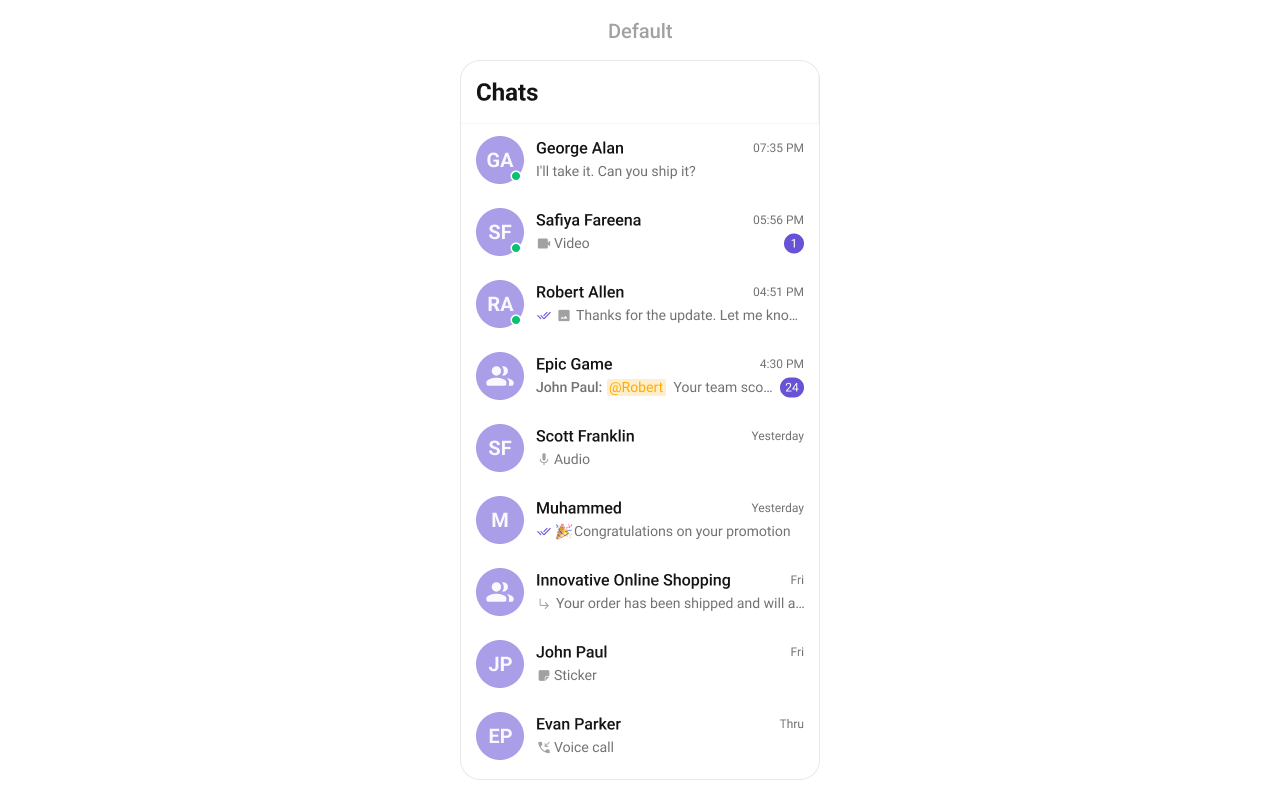
CometChatUIKit.init(), a user logged in, and the cometchat-chat-uikit-android dependency added.
To add programmatically in an Activity:
- Kotlin
- Java
YourActivity.kt
override fun onCreate(savedInstanceState: Bundle?) {
super.onCreate(savedInstanceState)
setContentView(CometChatConversations(this))
}
YourActivity.java
@Override
protected void onCreate(Bundle savedInstanceState) {
super.onCreate(savedInstanceState);
setContentView(new CometChatConversations(this));
}
- Kotlin
- Java
YourFragment.kt
override fun onCreateView(inflater: LayoutInflater,container: ViewGroup?,savedInstanceState: Bundle?): View {
return CometChatConversations(requireContext())
}
YourFragment.java
@Override
public View onCreateView(LayoutInflater inflater, ViewGroup container,
Bundle savedInstanceState) {
return new CometChatConversations(getContext());
}
Filtering Conversations
Pass aConversationsRequest.ConversationsRequestBuilder to setConversationsRequestBuilder. Pass the builder instance — not the result of .build().
- Kotlin
- Java
val builder = ConversationsRequest.ConversationsRequestBuilder()
builder.setConversationType(CometChatConstants.CONVERSATION_TYPE_USER)
builder.setLimit(50)
cometChatConversations.setConversationsRequestBuilder(builder)
ConversationsRequest.ConversationsRequestBuilder builder = new ConversationsRequest.ConversationsRequestBuilder();
builder.setConversationType(CometChatConstants.CONVERSATION_TYPE_USER);
builder.setLimit(50);
cometChatConversations.setConversationsRequestBuilder(builder);
Filter Recipes
| Recipe | Code |
|---|---|
| Only user conversations | builder.setConversationType(CometChatConstants.CONVERSATION_TYPE_USER) |
| Only group conversations | builder.setConversationType(CometChatConstants.CONVERSATION_TYPE_GROUP) |
| Limit to 10 per page | builder.setLimit(10) |
| With specific tags | builder.setTags(Arrays.asList("vip")) |
| Filter by user tags | builder.withUserAndGroupTags(true); builder.setUserTags(Arrays.asList("premium")) |
| Filter by group tags | builder.withUserAndGroupTags(true); builder.setGroupTags(Arrays.asList("support")) |
Default page size is 30. The component uses infinite scroll — the next page loads as the user scrolls to the bottom. Refer to ConversationsRequestBuilder for the full builder API.
Actions and Events
Callback Methods
setOnItemClick
Fires when a conversation row is tapped. Primary navigation hook — set the active conversation and render the message view.
- Kotlin
- Java
YourActivity.kt
cometchatConversations.onItemClick = OnItemClick { view, position, conversation ->
}
YourActivity.java
cometchatConversations.setOnItemClick((view1, position, conversation) -> {
});
What this does: Replaces the default item-click behavior. When a user taps a conversation, your custom lambda executes instead of the built-in navigation.
setOnItemLongClick
Fires when a conversation row is long-pressed. Use for additional actions like delete or select.
- Kotlin
- Java
YourActivity.kt
cometchatConversations.onItemLongClick = OnItemLongClick({ view, position, conversation ->
})
YourActivity.java
cometchatConversations.setOnItemLongClick((view1, position, conversation) -> {
});
What this does: Replaces the default long-press behavior. When a user long-presses a conversation, your custom lambda executes.
setOnBackPressListener
Fires when the user presses the back button in the app bar. Default: navigates to the previous activity.
- Kotlin
- Java
YourActivity.kt
cometchatConversations.onBackPressListener = OnBackPress {
}
YourActivity.java
cometchatConversations.setOnBackPressListener(() -> {
});
What this does: Overrides the default back-press navigation. When the user taps the back button, your custom logic runs instead.
setOnSelect
Fires when a conversation is checked/unchecked in multi-select mode. Requires setSelectionMode to be set.
- Kotlin
- Java
YourActivity.kt
cometchatConversations.setOnSelect(object : OnSelection<Conversation?> {
override fun onSelection(t: MutableList<Conversation?>?) {
}
})
YourActivity.java
cometchatConversations.setOnSelect(t -> {
});
What this does: Registers a callback that fires when the user selects one or more conversations. The callback receives the list of selected Conversation objects.
setOnError
Fires on internal errors (network failure, auth issue, SDK exception).
- Kotlin
- Java
YourActivity.kt
cometchatConversations.setOnError {
}
YourActivity.java
cometchatConversations.setOnError(cometchatException -> {
});
What this does: Registers an error listener. If the component encounters an error (e.g., network failure), your callback receives the CometChatException.
setOnLoad
Fires when the list is successfully fetched and loaded.
- Kotlin
- Java
YourActivity.kt
cometchatConversations.setOnLoad(object : OnLoad<Conversation?> {
override fun onLoad(list: MutableList<Conversation?>?) {
}
})
YourActivity.java
cometchatConversations.setOnLoad(list -> {
});
What this does: Registers a callback that fires after the conversation list is fetched and rendered. The callback receives the list of loaded Conversation objects.
setOnEmpty
Fires when the list is empty, enabling custom handling such as showing a placeholder.
- Kotlin
- Java
YourActivity.kt
cometchatConversations.setOnEmpty{
}
YourActivity.java
cometchatConversations.setOnEmpty(() -> {
});
What this does: Registers a callback that fires when the conversation list has no items. Use this to show a custom empty-state message or trigger other logic.
setOnSearchClickListener
Fires when the user taps the search icon in the toolbar.
- Kotlin
- Java
YourActivity.kt
cometchatConversations.setOnSearchClickListener {
}
YourActivity.java
cometchatConversations.setOnSearchClickListener(() -> {
});
What this does: Overrides the default search icon tap behavior. When the user taps the search icon, your custom logic runs instead.
- Verify: After setting an action callback, trigger the corresponding user interaction (tap, long-press, back, select, search) and confirm your custom logic executes instead of the default behavior.
Global UI Events
CometChatConversationEvents emits events subscribable from anywhere in the application. Add a listener and remove it when no longer needed.
| Event | Fires when | Payload |
|---|---|---|
ccConversationDeleted | A conversation is deleted from the list | Conversation |
- Kotlin
- Java
Add Listener
CometChatConversationEvents.addListener("LISTENER_TAG", object : CometChatConversationEvents() {
override fun ccConversationDeleted(conversation: Conversation) {
super.ccConversationDeleted(conversation)
}
})
CometChatConversationEvents.removeListener("LISTENER_TAG");
Add Listener
CometChatConversationEvents.addListener("YOUR_LISTENER_TAG", new CometChatConversationEvents() {
@Override
public void ccConversationDeleted(Conversation conversation) {
super.ccConversationDeleted(conversation);
}
});
CometChatConversationEvents.removeListener("YOUR_LISTENER_TAG");
SDK Events (Real-Time, Automatic)
The component listens to these SDK events internally. No manual attachment needed unless additional side effects are required.| SDK Listener | Internal behavior |
|---|---|
onTextMessageReceived / onMediaMessageReceived / onCustomMessageReceived | Moves conversation to top, updates last message preview and unread count |
onTypingStarted / onTypingEnded | Shows/hides typing indicator in the subtitle |
onMessagesDelivered / onMessagesRead / onMessagesDeliveredToAll / onMessagesReadByAll | Updates receipt ticks (unless setReceiptsVisibility(View.GONE)) |
onUserOnline / onUserOffline | Updates online/offline status dot (unless setUserStatusVisibility(View.GONE)) |
onGroupMemberJoined / onGroupMemberLeft / onGroupMemberKicked / onGroupMemberBanned / onMemberAddedToGroup | Updates group conversation metadata |
Automatic: new messages, typing indicators, receipts, user presence, group membership changes.
Manual: deleting a conversation via the SDK directly (not through the component’s context menu) requires emitting CometChatConversationEvents.ccConversationDeleted for the UI to update.
Functionality
Small functional customizations such as toggling visibility of UI elements, setting custom sounds, and configuring selection modes.| Methods | Description | Code |
|---|---|---|
setBackIconVisibility | Toggles visibility for the back button in the app bar | .setBackIconVisibility(View.VISIBLE); |
setToolbarVisibility | Toggles visibility for the toolbar in the app bar | .setToolbarVisibility(View.GONE); |
setLoadingStateVisibility | Hides the loading state while fetching conversations | .setLoadingStateVisibility(View.GONE); |
setDeleteConversationOptionVisibility | Toggles visibility for the delete option on long press | .setDeleteConversationOptionVisibility(View.GONE); |
setErrorStateVisibility | Hides the error state on fetching conversations | .setErrorStateVisibility(View.GONE); |
setEmptyStateVisibility | Hides the empty state on fetching conversations | .setEmptyStateVisibility(View.GONE); |
setSeparatorVisibility | Controls visibility of separators in the list view | .setSeparatorVisibility(View.GONE); |
setUserStatusVisibility | Controls visibility of the online status indicator | .setUserStatusVisibility(View.GONE); |
setGroupTypeVisibility | Controls visibility of the group type indicator | .setGroupTypeVisibility(View.GONE); |
setReceiptsVisibility | Hides receipts shown in the subtitle without disabling read/delivered marking | .setReceiptsVisibility(View.GONE); |
setSearchBoxVisibility | Controls visibility of the search box in the toolbar | .setSearchBoxVisibility(View.GONE); |
setSearchInputEndIconVisibility | Controls visibility of the end icon in the search bar | .setSearchInputEndIconVisibility(View.GONE); |
hideReceipts | Hides read receipts in the conversation list (adapter-level) | .hideReceipts(true); |
disableSoundForMessages | Disables sound notifications for incoming messages | .disableSoundForMessages(true); |
setCustomSoundForMessages | Sets a custom sound file for incoming message notifications | .setCustomSoundForMessages(com.cometchat.chatuikit.R.raw.cometchat_beep2); |
setSelectionMode | Determines the selection mode (single or multiple) | .setSelectionMode(UIKitConstants.SelectionMode.MULTIPLE); |
setSearchInputText | Sets the text in the search input field | .setSearchInputText("Sample Text"); |
setSearchPlaceholderText | Sets the placeholder text for the search input field | .setSearchPlaceholderText("Enter search term"); |
- Verify: After calling a visibility method, confirm the corresponding UI element is shown or hidden. After calling
disableSoundForMessages(true), confirm no sound plays on incoming messages.
Custom View Slots
Each slot replaces a section of the default UI. Slots that accept aConversation parameter receive the conversation object for that row via the ConversationsViewHolderListener pattern (createView + bindView).
| Slot | Method | Replaces |
|---|---|---|
| Leading view | setLeadingView(ConversationsViewHolderListener) | Avatar / left section |
| Title view | setTitleView(ConversationsViewHolderListener) | Name / title text |
| Subtitle view | setSubtitleView(ConversationsViewHolderListener) | Last message preview |
| Trailing view | setTrailingView(ConversationsViewHolderListener) | Timestamp / badge / right section |
| Item view | setItemView(ConversationsViewHolderListener) | Entire list item row |
| Loading view | setLoadingView(@LayoutRes int) | Loading spinner |
| Empty view | setEmptyView(@LayoutRes int) | Empty state |
| Error view | setErrorView(@LayoutRes int) | Error state |
| Overflow menu | setOverflowMenu(View) | Toolbar menu |
| Options (replace) | setOptions(Function2) | Long-press context menu (replaces defaults) |
| Options (append) | addOptions(Function2) | Long-press context menu (appends to defaults) |
setLeadingView
Replace the avatar / left section. Typing-aware avatar example.
- Kotlin
- Java
cometchatConversations.setLeadingView(object :
ConversationsViewHolderListener() {
override fun createView(
context: Context?,
listItem: CometchatConversationsListItemsBinding?
): View? {
return null
}
override fun bindView(
context: Context,
createdView: View,
conversation: Conversation,
holder: RecyclerView.ViewHolder,
conversationList: List<Conversation>,
position: Int
) {
}
})
cometchatConversations.setLeadingView(new ConversationsViewHolderListener() {
@Override
public View createView(Context context, CometchatConversationsListItemsBinding listItem) {
return null;
}
@Override
public void bindView(Context context, View createdView, Conversation conversation, RecyclerView.ViewHolder holder, List<Conversation> conversationList, int position) {
}
});
What this does: Registers aConversationsViewHolderListenerthat provides a custom view for the leading (left) area of each conversation item.createViewinflates your layout, andbindViewpopulates it with conversation data.
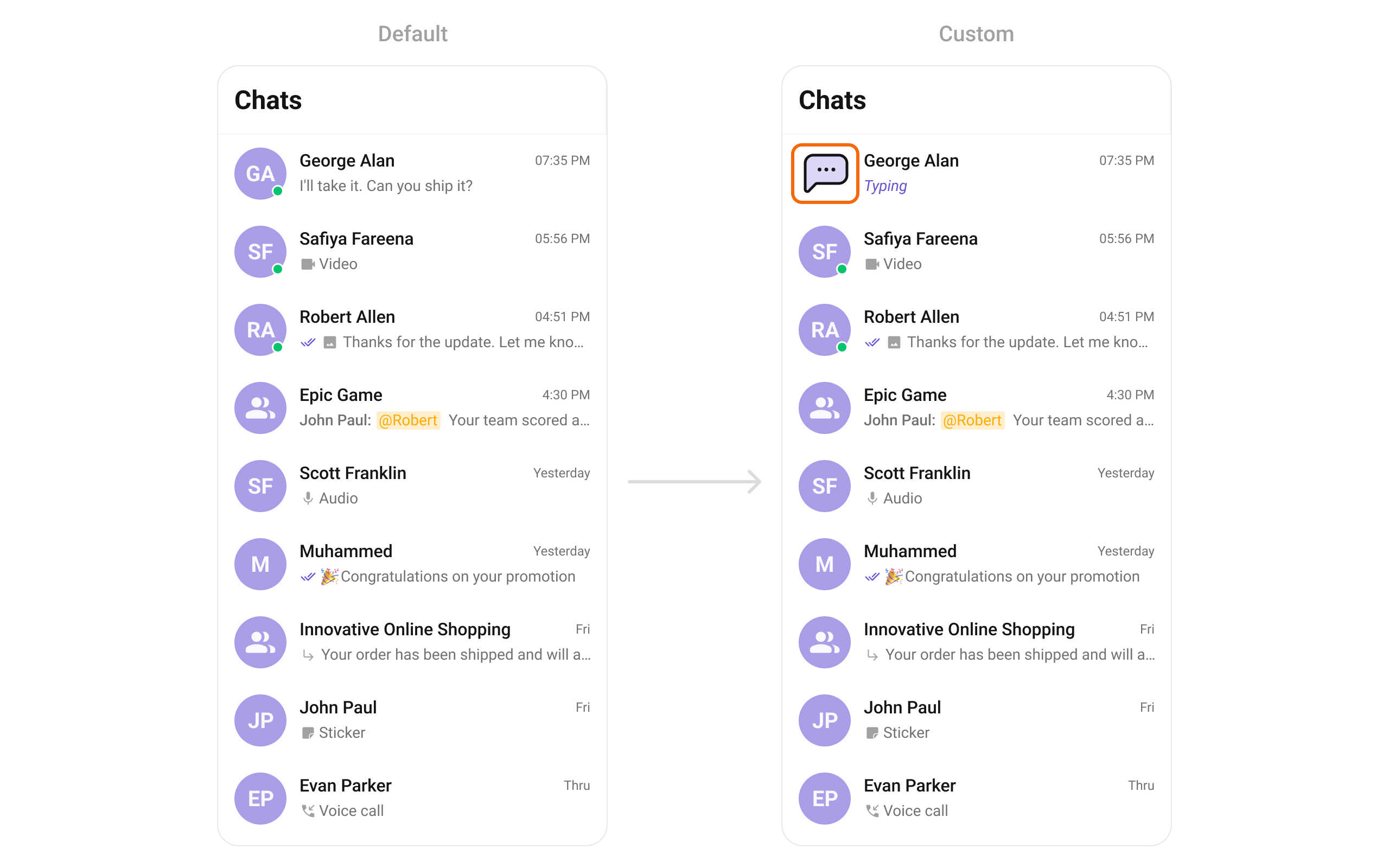
drawable/chat_dots.xml
<vector xmlns:android="http://schemas.android.com/apk/res/android"
android:width="48dp"
android:height="48dp"
android:viewportWidth="48"
android:viewportHeight="48">
<path
android:pathData="M5,15.5C5,11.358 8.358,8 12.5,8H36C40.142,8 43.5,11.358 43.5,15.5V26.535C43.5,30.677 40.142,34.035 36,34.035H16.149C15.47,34.035 14.82,34.311 14.349,34.8L8.44,40.931C7.191,42.227 5,41.342 5,39.543V15.5Z"
android:strokeLineJoin="round"
android:strokeWidth="2.5"
android:fillColor="#DCD7F6"
android:strokeColor="#141414"/>
<path
android:pathData="M18.25,22.75C19.078,22.75 19.75,22.078 19.75,21.25C19.75,20.421 19.078,19.75 18.25,19.75C17.421,19.75 16.75,20.421 16.75,21.25C16.75,22.078 17.421,22.75 18.25,22.75ZM24.5,22.75C25.329,22.75 26,22.078 26,21.25C26,20.421 25.329,19.75 24.5,19.75C23.671,19.75 23,20.421 23,21.25C23,22.078 23.671,22.75 24.5,22.75ZM31,22.75C31.829,22.75 32.5,22.078 32.5,21.25C32.5,20.421 31.829,19.75 31,19.75C30.171,19.75 29.5,20.421 29.5,21.25C29.5,22.078 30.171,22.75 31,22.75Z"
android:strokeWidth="0.5"
android:fillColor="#141414"
android:strokeColor="#141414"/>
</vector>
What this does: Defines a vector drawable of a chat bubble with three dots, used as a typing indicator icon in the custom leading view.Create a
leading_view.xml custom layout:
<?xml version="1.0" encoding="utf-8"?>
<LinearLayout xmlns:android="http://schemas.android.com/apk/res/android"
xmlns:app="http://schemas.android.com/apk/res-auto"
xmlns:tools="http://schemas.android.com/tools"
android:layout_width="wrap_content"
android:layout_height="wrap_content"
android:orientation="vertical">
<androidx.constraintlayout.widget.ConstraintLayout
android:id="@+id/conversation_leading_view"
android:layout_width="wrap_content"
android:layout_height="wrap_content"
android:layout_centerVertical="true">
<ImageView
android:id="@+id/leading_iv"
android:layout_width="@dimen/cometchat_48dp"
android:layout_height="@dimen/cometchat_48dp"
android:src="@drawable/chat_dots"
android:visibility="gone"
tools:ignore="MissingConstraints" />
<androidx.constraintlayout.widget.ConstraintLayout
android:id="@+id/leading_view"
android:layout_width="@dimen/cometchat_48dp"
android:layout_height="@dimen/cometchat_48dp"
tools:ignore="MissingConstraints">
<com.cometchat.chatuikit.shared.views.avatar.CometChatAvatar
android:id="@+id/conversations_avatar"
android:layout_width="@dimen/cometchat_48dp"
android:layout_height="@dimen/cometchat_48dp" />
<com.cometchat.chatuikit.shared.views.statusindicator.CometChatStatusIndicator
android:id="@+id/status_and_type_indicator"
android:layout_width="@dimen/cometchat_15dp"
android:layout_height="@dimen/cometchat_15dp"
app:layout_constraintBottom_toBottomOf="parent"
app:layout_constraintEnd_toEndOf="parent" />
</androidx.constraintlayout.widget.ConstraintLayout>
</androidx.constraintlayout.widget.ConstraintLayout>
</LinearLayout>
- Kotlin
- Java
val typingIndicatorHashMap = HashMap<String, Boolean>()
CometChat.addMessageListener(System.currentTimeMillis().toString() + "", object : MessageListener() {
override fun onTypingStarted(typingIndicator: TypingIndicator) {
if (typingIndicator.receiverType == CometChatConstants.RECEIVER_TYPE_USER) {
if (typingIndicatorHashMap.containsKey(typingIndicator.sender.uid)) {
return
}
typingIndicatorHashMap[typingIndicator.sender.uid] = true
} else {
if (typingIndicatorHashMap.containsKey(typingIndicator.receiverId)) {
return
}
typingIndicatorHashMap[typingIndicator.receiverId] = true
}
}
override fun onTypingEnded(typingIndicator: TypingIndicator) {
if (typingIndicator.receiverType == CometChatConstants.RECEIVER_TYPE_USER) {
typingIndicatorHashMap.remove(typingIndicator.sender.uid)
} else {
typingIndicatorHashMap.remove(typingIndicator.receiverId)
}
}
})
binding.cometchatConversations.setLeadingView(object : ConversationsViewHolderListener() {
override fun createView(context: Context?, listItem: CometchatConversationsListItemsBinding?): View {
return LayoutInflater.from(context).inflate(R.layout.leading_view, null)
}
override fun bindView(
context: Context,
createdView: View,
conversation: Conversation,
holder: RecyclerView.ViewHolder,
conversationList: List<Conversation>,
position: Int
) {
val imageView = createdView.findViewById<ImageView>(R.id.leading_iv)
val constraintLayout = createdView.findViewById<ConstraintLayout>(R.id.leading_view)
val avatar = createdView.findViewById<CometChatAvatar>(R.id.conversations_avatar)
val statusIndicator = createdView.findViewById<CometChatStatusIndicator>(R.id.status_and_type_indicator)
avatar.setAvatar(ConversationsUtils.getConversationTitle(conversation), ConversationsUtils.getConversationAvatar(conversation))
if (conversation.conversationType == CometChatConstants.RECEIVER_TYPE_USER) {
if ((conversation.conversationWith as User).status.equals(CometChatConstants.USER_STATUS_ONLINE, ignoreCase = true)) {
if (!Utils.isBlocked((conversation.conversationWith as User))) {
statusIndicator.statusIndicator = StatusIndicator.ONLINE
} else {
statusIndicator.statusIndicator = StatusIndicator.OFFLINE
}
} else {
statusIndicator.statusIndicator = StatusIndicator.OFFLINE
}
if (typingIndicatorHashMap.containsKey((conversation.conversationWith as User).uid)) {
imageView.visibility = View.VISIBLE
constraintLayout.visibility = View.GONE
} else {
imageView.visibility = View.GONE
constraintLayout.visibility = View.VISIBLE
}
} else {
if (typingIndicatorHashMap.containsKey((conversation.conversationWith as Group).guid)) {
imageView.visibility = View.VISIBLE
constraintLayout.visibility = View.GONE
} else {
imageView.visibility = View.GONE
constraintLayout.visibility = View.VISIBLE
}
}
}
})
HashMap<String, Boolean> typingIndicatorHashMap = new HashMap<>();
CometChat.addMessageListener(System.currentTimeMillis() + "", new CometChat.MessageListener() {
@Override
public void onTypingStarted(TypingIndicator typingIndicator) {
if (typingIndicator.getReceiverType().equals(CometChatConstants.RECEIVER_TYPE_USER)) {
if (typingIndicatorHashMap.containsKey(typingIndicator.getSender().getUid())) {
return;
}
typingIndicatorHashMap.put(typingIndicator.getSender().getUid(), true);
} else {
if (typingIndicatorHashMap.containsKey(typingIndicator.getReceiverId())) {
return;
}
typingIndicatorHashMap.put(typingIndicator.getReceiverId(), true);
}
}
@Override
public void onTypingEnded(TypingIndicator typingIndicator) {
if (typingIndicator.getReceiverType().equals(CometChatConstants.RECEIVER_TYPE_USER)) {
typingIndicatorHashMap.remove(typingIndicator.getSender().getUid());
} else {
typingIndicatorHashMap.remove(typingIndicator.getReceiverId());
}
}
});
cometchatConversations.setLeadingView(new ConversationsViewHolderListener() {
@Override
public View createView(Context context, CometchatConversationsListItemsBinding listItem) {
return LayoutInflater.from(context).inflate(R.layout.leading_view, null);
}
@Override
public void bindView(Context context,
View createdView,
Conversation conversation,
RecyclerView.ViewHolder holder,
List<Conversation> conversationList,
int position) {
ImageView imageView = createdView.findViewById(R.id.leading_iv);
ConstraintLayout constraintLayout = createdView.findViewById(R.id.leading_view);
CometChatAvatar avatar = createdView.findViewById(R.id.conversations_avatar);
CometChatStatusIndicator statusIndicator = createdView.findViewById(R.id.status_and_type_indicator);
avatar.setAvatar(ConversationsUtils.getConversationTitle(conversation), ConversationsUtils.getConversationAvatar(conversation));
if (conversation.getConversationType().equals(CometChatConstants.RECEIVER_TYPE_USER)) {
if (((User) conversation.getConversationWith()).getStatus().equalsIgnoreCase(CometChatConstants.USER_STATUS_ONLINE)) {
if (!Utils.isBlocked(((User) conversation.getConversationWith()))) {
statusIndicator.setStatusIndicator(StatusIndicator.ONLINE);
} else {
statusIndicator.setStatusIndicator(StatusIndicator.OFFLINE);
}
} else {
statusIndicator.setStatusIndicator(StatusIndicator.OFFLINE);
}
if (typingIndicatorHashMap.containsKey(((User) conversation.getConversationWith()).getUid())) {
imageView.setVisibility(View.VISIBLE);
constraintLayout.setVisibility(GONE);
} else {
imageView.setVisibility(GONE);
constraintLayout.setVisibility(View.VISIBLE);
}
} else {
if (typingIndicatorHashMap.containsKey(((Group) conversation.getConversationWith()).getGuid())) {
imageView.setVisibility(View.VISIBLE);
constraintLayout.setVisibility(GONE);
} else {
imageView.setVisibility(GONE);
constraintLayout.setVisibility(View.VISIBLE);
}
}
}
});
setTrailingView
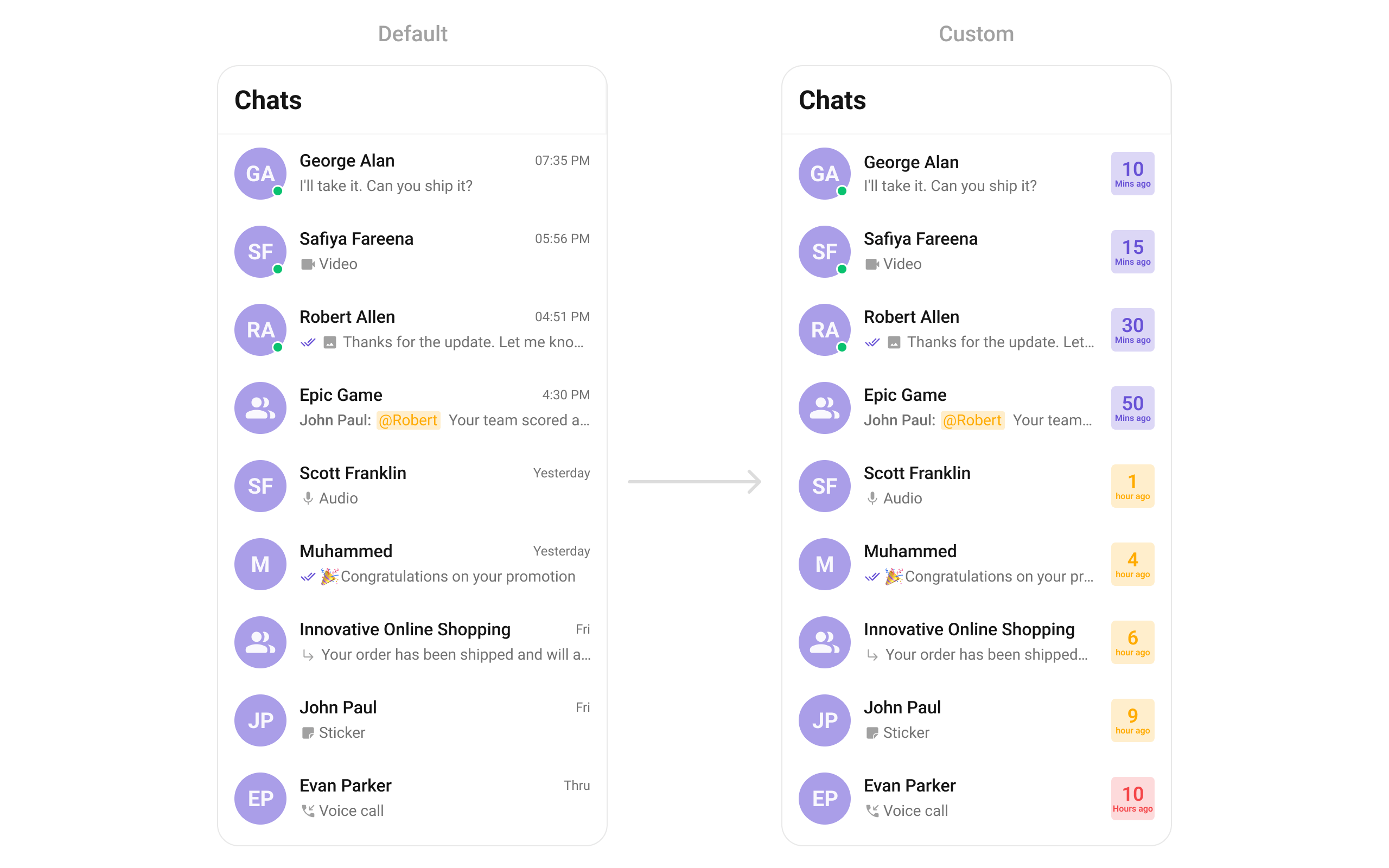
Replace the timestamp / badge / right section.
- Kotlin
- Java
cometchatConversations.setTrailingView(object :
ConversationsViewHolderListener() {
override fun createView(
context: Context?,
listItem: CometchatConversationsListItemsBinding?
): View? {
return null
}
override fun bindView(
context: Context,
createdView: View,
conversation: Conversation,
holder: RecyclerView.ViewHolder,
conversationList: List<Conversation>,
position: Int
) {
}
})
cometchatConversations.setTrailingView(new ConversationsViewHolderListener() {
@Override
public View createView(Context context, CometchatConversationsListItemsBinding listItem) {
return null;
}
@Override
public void bindView(Context context, View createdView, Conversation conversation, RecyclerView.ViewHolder holder, List<Conversation> conversationList, int position) {
}
});
custom_tail_view.xml custom layout file:
<?xml version="1.0" encoding="utf-8"?>
<LinearLayout xmlns:android="http://schemas.android.com/apk/res/android"
xmlns:app="http://schemas.android.com/apk/res-auto"
android:layout_width="wrap_content"
android:layout_height="wrap_content">
<com.google.android.material.card.MaterialCardView
android:id="@+id/card"
android:layout_width="wrap_content"
android:layout_height="wrap_content"
android:elevation="@dimen/cometchat_0dp"
app:cardCornerRadius="@dimen/cometchat_6dp"
app:cardElevation="@dimen/cometchat_0dp">
<LinearLayout
android:layout_width="wrap_content"
android:layout_height="wrap_content"
android:orientation="vertical"
android:padding="@dimen/cometchat_5dp">
<TextView
android:id="@+id/hours"
android:layout_width="wrap_content"
android:layout_height="wrap_content"
android:layout_gravity="center_horizontal"
android:textAppearance="?attr/cometchatTextAppearanceHeading4Bold" />
<TextView
android:id="@+id/time_title"
android:layout_width="wrap_content"
android:layout_height="wrap_content"
android:textAppearance="?attr/cometchatTextAppearanceHeading4Bold" />
</LinearLayout>
</com.google.android.material.card.MaterialCardView>
</LinearLayout>
What this does: Defines a custom trailing view layout with aInflate and bind with color-coded time badges:MaterialCardViewcontaining twoTextViewelements for displaying the time value and unit (e.g., “5” and “Min ago”).
- Kotlin
- Java
cometchatConversations.setTrailingView(object : ConversationsViewHolderListener() {
override fun createView(context: Context?, listItem: CometchatConversationsListItemsBinding?): View {
return LayoutInflater.from(context).inflate(R.layout.custom_tail_view, null)
}
override fun bindView(
context: Context,
createdView: View,
conversation: Conversation,
holder: RecyclerView.ViewHolder,
conversationList: List<Conversation>,
position: Int
) {
val card = createdView.findViewById<MaterialCardView>(R.id.card)
val tvHours = createdView.findViewById<TextView>(R.id.hours)
val tvMessage = createdView.findViewById<TextView>(R.id.time_title)
var timestamp = conversation.updatedAt * 1000
if (timestamp.toString().length == 10) {
timestamp *= 1000
}
val now = Calendar.getInstance()
val lastSeen = Calendar.getInstance()
lastSeen.timeInMillis = timestamp
val diffInMillis = now.timeInMillis - lastSeen.timeInMillis
val diffInMinutes = TimeUnit.MILLISECONDS.toMinutes(diffInMillis)
val diffInHours = TimeUnit.MILLISECONDS.toHours(diffInMillis)
if (diffInMinutes == 0L) {
tvHours.text = "1"
tvMessage.text = "Min ago"
card.setCardBackgroundColor(Utils.applyColorWithAlphaValue(Color.parseColor("#6852D6"), 40))
tvMessage.setTextColor(Color.parseColor("#6852D6"))
tvHours.setTextColor(Color.parseColor("#6852D6"))
} else if (diffInMinutes < 60) {
tvHours.text = diffInMinutes.toString()
tvMessage.text = "Min ago"
card.setCardBackgroundColor(Utils.multiplyColorAlpha(Color.parseColor("#6852D6"), 40))
tvMessage.setTextColor(Color.parseColor("#6852D6"))
tvHours.setTextColor(Color.parseColor("#6852D6"))
} else if (diffInHours < 10) {
tvHours.text = diffInHours.toString()
tvMessage.text = "Hr ago"
tvMessage.setTextColor(Color.parseColor("#FFAB00"))
tvHours.setTextColor(Color.parseColor("#FFAB00"))
card.setCardBackgroundColor(Utils.multiplyColorAlpha(Color.parseColor("#FFAB00"), 40))
} else if (diffInHours < 1000) {
tvHours.text = diffInHours.toString()
tvMessage.text = "Hr ago"
tvMessage.setTextColor(Color.parseColor("#F44649"))
tvHours.setTextColor(Color.parseColor("#F44649"))
card.setCardBackgroundColor(Utils.multiplyColorAlpha(Color.parseColor("#F44649"), 40))
}
}
})
cometchatConversations.setTrailingView(new ConversationsViewHolderListener() {
@Override
public View createView(Context context, CometchatConversationsListItemsBinding listItem) {
return LayoutInflater.from(context).inflate(R.layout.custom_tail_view, null);
}
@Override
public void bindView(Context context,
View createdView,
Conversation conversation,
RecyclerView.ViewHolder holder,
List<Conversation> conversationList,
int position) {
MaterialCardView card = createdView.findViewById(R.id.card);
TextView tvHours = createdView.findViewById(R.id.hours);
TextView tvMessage = createdView.findViewById(R.id.time_title);
long timestamp = conversation.getUpdatedAt() * 1000;
if (String.valueOf(timestamp).length() == 10) {
timestamp *= 1000;
}
Calendar now = Calendar.getInstance();
Calendar lastSeen = Calendar.getInstance();
lastSeen.setTimeInMillis(timestamp);
long diffInMillis = now.getTimeInMillis() - lastSeen.getTimeInMillis();
long diffInMinutes = TimeUnit.MILLISECONDS.toMinutes(diffInMillis);
long diffInHours = TimeUnit.MILLISECONDS.toHours(diffInMillis);
if (diffInMinutes == 0) {
tvHours.setText("1");
tvMessage.setText("Min ago");
card.setCardBackgroundColor(Utils.applyColorWithAlphaValue(Color.parseColor("#6852D6"), 40));
tvMessage.setTextColor(Color.parseColor("#6852D6"));
tvHours.setTextColor(Color.parseColor("#6852D6"));
} else if (diffInMinutes < 60) {
tvHours.setText(diffInMinutes + "");
tvMessage.setText("Min ago");
card.setCardBackgroundColor(Utils.multiplyColorAlpha(Color.parseColor("#6852D6"), 40));
tvMessage.setTextColor(Color.parseColor("#6852D6"));
tvHours.setTextColor(Color.parseColor("#6852D6"));
} else if (diffInHours < 10) {
tvHours.setText(diffInHours + "");
tvMessage.setText("Hr ago");
tvMessage.setTextColor(Color.parseColor("#FFAB00"));
tvHours.setTextColor(Color.parseColor("#FFAB00"));
card.setCardBackgroundColor(Utils.multiplyColorAlpha(Color.parseColor("#FFAB00"), 40));
} else if (diffInHours < 1000) {
tvHours.setText(diffInHours + "");
tvMessage.setText("Hr ago");
tvMessage.setTextColor(Color.parseColor("#F44649"));
tvHours.setTextColor(Color.parseColor("#F44649"));
card.setCardBackgroundColor(Utils.multiplyColorAlpha(Color.parseColor("#F44649"), 40));
}
}
});
setTitleView
Replace the name / title text.
- Kotlin
- Java
cometchatConversations.setTitleView(object :
ConversationsViewHolderListener() {
override fun createView(
context: Context?,
listItem: CometchatConversationsListItemsBinding?
): View? {
return null
}
override fun bindView(
context: Context,
createdView: View,
conversation: Conversation,
holder: RecyclerView.ViewHolder,
conversationList: List<Conversation>,
position: Int
) {
}
})
cometchatConversations.setTitleView(new ConversationsViewHolderListener() {
@Override
public View createView(Context context, CometchatConversationsListItemsBinding listItem) {
return null;
}
@Override
public void bindView(Context context, View createdView, Conversation conversation, RecyclerView.ViewHolder holder, List<Conversation> conversationList, int position) {
}
});
custom_title_view.xml layout:
custom_title_view.xml
<?xml version="1.0" encoding="utf-8"?>
<LinearLayout xmlns:android="http://schemas.android.com/apk/res/android"
android:layout_width="match_parent"
android:layout_height="wrap_content"
android:orientation="horizontal"
android:gravity="center_vertical">
<TextView
android:id="@+id/name"
android:layout_width="wrap_content"
android:layout_height="wrap_content"
android:textAppearance="?attr/cometchatTextAppearanceHeading4Bold"
android:maxLines="1"
android:ellipsize="end" />
<TextView
android:id="@+id/status"
android:layout_width="wrap_content"
android:layout_height="wrap_content"
android:layout_marginStart="4dp"
android:textAppearance="?attr/cometchatTextAppearanceCaption1Regular"
android:textColor="?attr/cometchatTextColorSecondary"
android:maxLines="1"
android:ellipsize="end"
android:visibility="gone" />
</LinearLayout>
What this does: Defines a custom title layout with the conversation name and an inline user status message.
- Kotlin
- Java
cometchatConversations.setTitleView(object : ConversationsViewHolderListener() {
override fun createView(context: Context?, listItem: CometchatConversationsListItemsBinding?): View {
return LayoutInflater.from(context).inflate(R.layout.custom_title_view, null)
}
override fun bindView(
context: Context,
createdView: View,
conversation: Conversation,
holder: RecyclerView.ViewHolder,
conversationList: List<Conversation>,
position: Int
) {
val name = createdView.findViewById<TextView>(R.id.name)
val status = createdView.findViewById<TextView>(R.id.status)
name.text = ConversationsUtils.getConversationTitle(conversation)
if (conversation.conversationType == CometChatConstants.RECEIVER_TYPE_USER) {
status.visibility = View.VISIBLE
status.text = "• " + (conversation.conversationWith as User).statusMessage
} else {
status.visibility = View.GONE
}
}
})
cometchatConversations.setTitleView(new ConversationsViewHolderListener() {
@Override
public View createView(Context context, CometchatConversationsListItemsBinding listItem) {
return LayoutInflater.from(context).inflate(R.layout.custom_title_view, null);
}
@Override
public void bindView(Context context,
View createdView,
Conversation conversation,
RecyclerView.ViewHolder holder,
List<Conversation> conversationList,
int position) {
TextView name = createdView.findViewById(R.id.name);
TextView status = createdView.findViewById(R.id.status);
name.setText(ConversationsUtils.getConversationTitle(conversation));
if (conversation.getConversationType().equals(CometChatConstants.RECEIVER_TYPE_USER)) {
status.setVisibility(View.VISIBLE);
status.setText("• " + ((User) conversation.getConversationWith()).getStatusMessage());
} else {
status.setVisibility(View.GONE);
}
}
});
What this does: Registers a ConversationsViewHolderListener that provides a custom title view for each conversation item. The example inflates a layout with the conversation name and an inline user status message. For group conversations, the status is hidden.
setSubtitleView
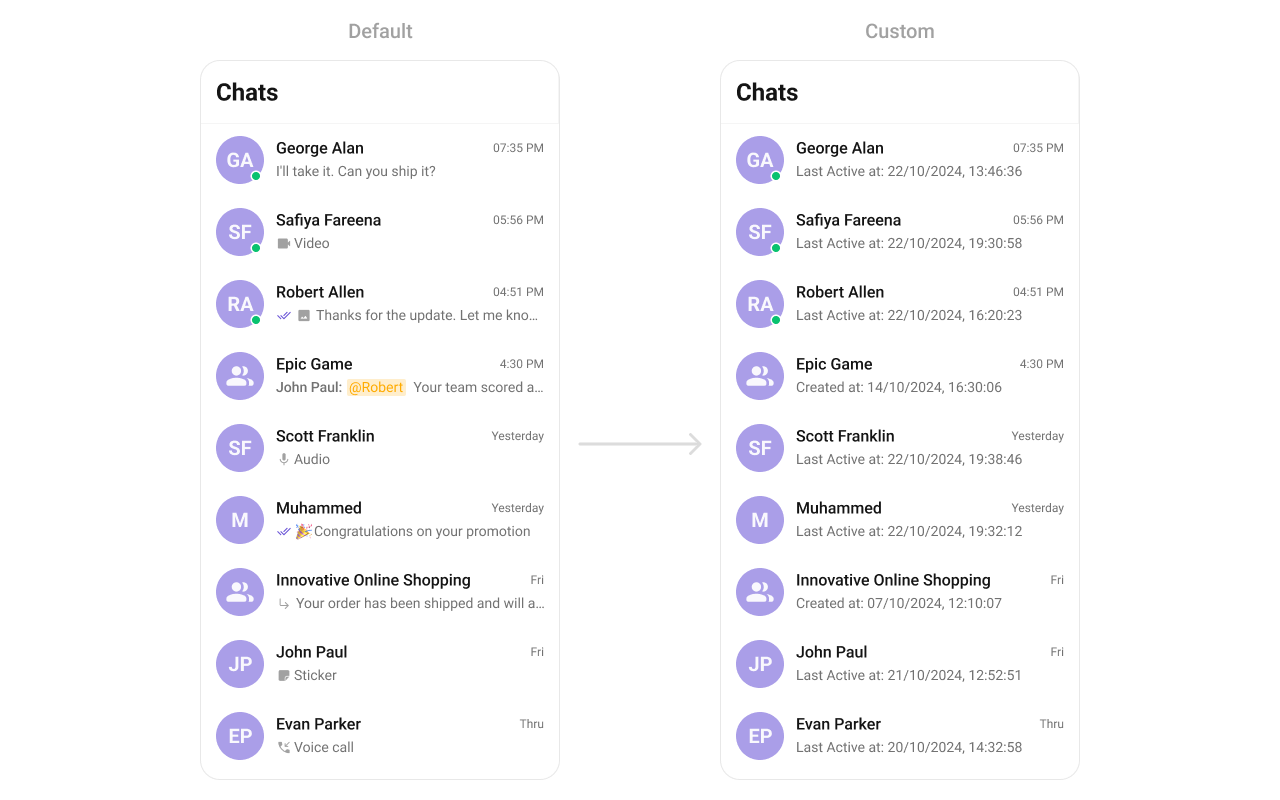
Replace the last message preview text.
- Kotlin
- Java
cometchatConversations.setSubtitleView(object :
ConversationsViewHolderListener() {
override fun createView(
context: Context?,
listItem: CometchatConversationsListItemsBinding?
): View? {
return null
}
override fun bindView(
context: Context,
createdView: View,
conversation: Conversation,
holder: RecyclerView.ViewHolder,
conversationList: List<Conversation>,
position: Int
) {
}
})
cometchatConversations.setSubtitleView(new ConversationsViewHolderListener() {
@Override
public View createView(Context context, CometchatConversationsListItemsBinding listItem) {
return null;
}
@Override
public void bindView(Context context, View createdView, Conversation conversation, RecyclerView.ViewHolder holder, List<Conversation> conversationList, int position) {
}
});
- Kotlin
- Java
cometchatConversations.setSubtitleView(object :
ConversationsViewHolderListener() {
override fun createView(
context: Context?,
listItem: CometchatConversationsListItemsBinding?
): View {
return TextView(context)
}
override fun bindView(
context: Context,
createdView: View,
conversation: Conversation,
holder: RecyclerView.ViewHolder,
conversationList: List<Conversation>,
position: Int
) {
val tvSubtitle = createdView as TextView
tvSubtitle.text =
"Last Active at: " + SimpleDateFormat("dd/MM/yyyy, HH:mm:ss").format(
conversation.updatedAt * 1000
)
tvSubtitle.setTextColor(Color.BLACK)
}
})
YourActivity.java
cometchatConversations.setSubtitleView(new ConversationsViewHolderListener() {
@Override
public View createView(Context context, CometchatConversationsListItemsBinding listItem) {
return new TextView(context);
}
@Override
public void bindView(Context context, View createdView, Conversation conversation, RecyclerView.ViewHolder holder, List<Conversation> conversationList, int position) {
TextView tvSubtitle = (TextView) createdView;
tvSubtitle.setText("Last Active at: "+new SimpleDateFormat("dd/MM/yyyy, HH:mm:ss").format(conversation.getUpdatedAt() * 1000));
tvSubtitle.setTextColor(Color.BLACK);
}
});
What this does: Registers aConversationsViewHolderListenerthat provides a custom subtitle view for each conversation item. The example creates aTextViewshowing the last active timestamp formatted as “dd/MM/yyyy, HH:mm:ss”.
setItemView
Replace the entire list item row.
- Kotlin
- Java
cometchatConversations.setItemView(object :
ConversationsViewHolderListener() {
override fun createView(
context: Context?,
listItem: CometchatConversationsListItemsBinding?
): View? {
return null
}
override fun bindView(
context: Context,
createdView: View,
conversation: Conversation,
holder: RecyclerView.ViewHolder,
conversationList: List<Conversation>,
position: Int
) {
}
})
cometchatConversations.setItemView(new ConversationsViewHolderListener() {
@Override
public View createView(Context context, CometchatConversationsListItemsBinding listItem) {
return null;
}
@Override
public void bindView(Context context, View createdView, Conversation conversation, RecyclerView.ViewHolder holder, List<Conversation> conversationList, int position) {
}
});
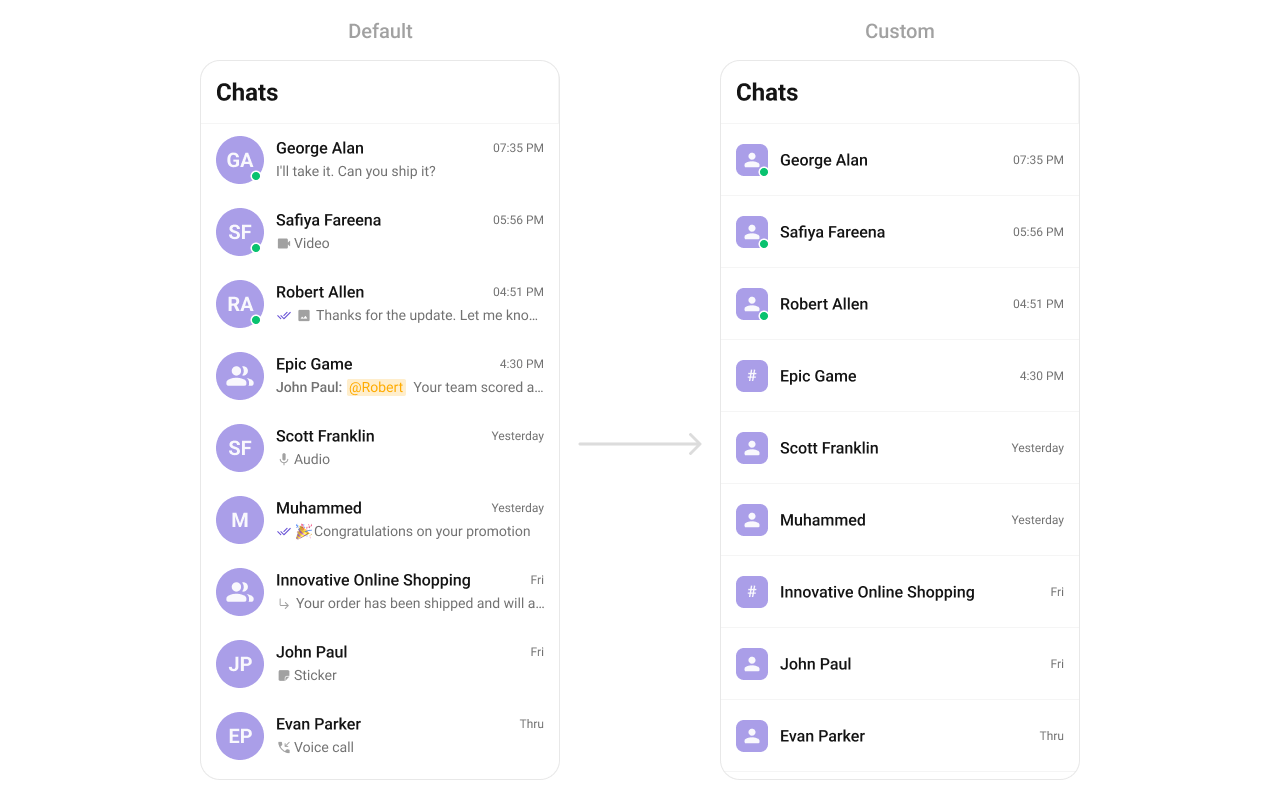
item_converation_list.xml custom layout file:
<?xml version="1.0" encoding="utf-8"?>
<LinearLayout xmlns:android="http://schemas.android.com/apk/res/android"
xmlns:app="http://schemas.android.com/apk/res-auto"
android:layout_width="match_parent"
android:layout_height="wrap_content"
android:orientation="vertical">
<LinearLayout
android:layout_width="match_parent"
android:layout_height="wrap_content"
android:layout_marginStart="@dimen/cometchat_padding_4"
android:layout_marginBottom="@dimen/cometchat_padding_3"
android:layout_marginEnd="@dimen/cometchat_padding_4"
android:layout_marginTop="@dimen/cometchat_padding_3"
android:gravity="center_vertical"
android:orientation="horizontal">
<androidx.constraintlayout.widget.ConstraintLayout
android:id="@+id/conversation_leading_view"
android:layout_width="@dimen/cometchat_45dp"
android:layout_height="@dimen/cometchat_45dp">
<com.cometchat.chatuikit.shared.views.avatar.CometChatAvatar
android:id="@+id/custom_avatar"
android:layout_width="match_parent"
android:layout_height="match_parent"
app:cometchatAvatarPlaceHolderTextAppearance="@style/CometChatTextAppearanceHeading4.Bold"
app:cometchatAvatarStrokeRadius="@dimen/cometchat_8dp" />
<com.cometchat.chatuikit.shared.views.statusindicator.CometChatStatusIndicator
android:id="@+id/status_and_type_indicator"
android:layout_width="@dimen/cometchat_12dp"
android:layout_height="@dimen/cometchat_12dp"
app:layout_constraintBottom_toBottomOf="parent"
app:layout_constraintEnd_toEndOf="parent" />
</androidx.constraintlayout.widget.ConstraintLayout>
<TextView
android:id="@+id/tvName"
android:layout_width="0dp"
android:textAppearance="@style/CometChatTextAppearanceHeading4.Medium"
android:layout_marginStart="@dimen/cometchat_margin_3"
android:layout_height="wrap_content"
android:layout_weight="1" />
<TextView
android:id="@+id/tvDate"
android:textAppearance="@style/CometChatTextAppearanceCaption1.Regular"
android:layout_width="wrap_content"
android:layout_height="wrap_content" />
</LinearLayout>
<View
android:layout_width="match_parent"
android:layout_height="1dp"
android:background="?attr/cometchatStrokeColorLight" />
</LinearLayout>
What this does: Defines a custom list item layout with a CometChatAvatar, status indicator, conversation name, and date — providing a compact, single-line conversation item design.
Inflate the XML and bind:
- Kotlin
- Java
cometchatConversations.setItemView(object :
ConversationsViewHolderListener() {
override fun createView(
context: Context?,
listItem: CometchatConversationsListItemsBinding?
): View {
return LayoutInflater.from(context)
.inflate(R.layout.custom_list_item_view, null, false)
}
override fun bindView(
context: Context,
createdView: View,
conversation: Conversation,
holder: RecyclerView.ViewHolder,
conversationList: List<Conversation>,
position: Int
) {
val avatar = createdView.findViewById<CometChatAvatar>(R.id.custom_avatar)
val title = createdView.findViewById<TextView>(R.id.tvName)
val tvDate = createdView.findViewById<TextView>(R.id.tvDate)
val name = ConversationsUtils.getConversationTitle(conversation)
title.text = name
avatar.setStyle(com.cometchat.chatuikit.R.style.CometChatAvatarStyle)
avatar.avatarPlaceHolderTextAppearance =
com.cometchat.chatuikit.R.style.CometChatTextAppearanceHeading4_Bold
avatar.setAvatar(name, ConversationsUtils.getConversationAvatar(conversation))
val simpleDateFormat = SimpleDateFormat("hh:mm a")
val date = simpleDateFormat.format(conversation.updatedAt * 1000)
tvDate.text = date
}
})
YourActivity.java
cometchatConversations.setItemView(new ConversationsViewHolderListener() {
@Override
public View createView(Context context, CometchatConversationsListItemsBinding listItem) {
return LayoutInflater.from(context).inflate(R.layout.custom_list_item_view, null, false);
}
@Override
public void bindView(Context context, View createdView, Conversation conversation, RecyclerView.ViewHolder holder, List<Conversation> conversationList, int position) {
CometChatAvatar avatar = createdView.findViewById(R.id.custom_avatar);
TextView title = createdView.findViewById(R.id.tvName);
TextView tvDate = createdView.findViewById(R.id.tvDate);
String name = ConversationsUtils.getConversationTitle(conversation);
title.setText(name);
avatar.setStyle(com.cometchat.chatuikit.R.style.CometChatAvatarStyle);
avatar.setAvatarPlaceHolderTextAppearance(com.cometchat.chatuikit.R.style.CometChatTextAppearanceHeading4_Bold);
avatar.setAvatar(name, ConversationsUtils.getConversationAvatar(conversation));
SimpleDateFormat simpleDateFormat = new SimpleDateFormat("hh:mm a");
String date = simpleDateFormat.format(conversation.getUpdatedAt() * 1000);
tvDate.setText(date);
}
});
What this does: Registers a ConversationsViewHolderListener that replaces the entire list item row. The example inflates a compact layout with an avatar, name, and date — replacing the default multi-line conversation item.
setDateTimeFormatter
Custom date/time formatting for conversation timestamps. Implement the DateTimeFormatterCallback interface to control how each time range is displayed:
| Method | Called when |
|---|---|
time(long timestamp) | Custom full timestamp format |
today(long timestamp) | Message is from today |
yesterday(long timestamp) | Message is from yesterday |
lastWeek(long timestamp) | Message is from the past week |
otherDays(long timestamp) | Message is older than a week |
minute(long timestamp) | Exactly 1 minute ago |
minutes(long diffInMinutesFromNow, long timestamp) | Multiple minutes ago (e.g., “5 minutes ago”) |
hour(long timestamp) | Exactly 1 hour ago |
hours(long diffInHourFromNow, long timestamp) | Multiple hours ago (e.g., “2 hours ago”) |
- Kotlin
- Java
cometchatConversations.setDateTimeFormatter(object : DateTimeFormatterCallback {
private val fullTimeFormatter = SimpleDateFormat("hh:mm a", Locale.getDefault())
private val dateFormatter = SimpleDateFormat("dd MMM yyyy", Locale.getDefault())
override fun time(timestamp: Long): String {
return fullTimeFormatter.format(Date(timestamp))
}
override fun today(timestamp: Long): String {
return "Today"
}
override fun yesterday(timestamp: Long): String {
return "Yesterday"
}
override fun lastWeek(timestamp: Long): String {
return "Last Week"
}
override fun otherDays(timestamp: Long): String {
return dateFormatter.format(Date(timestamp))
}
override fun minutes(diffInMinutesFromNow: Long, timestamp: Long): String {
return "$diffInMinutesFromNow mins ago"
}
override fun hours(diffInHourFromNow: Long, timestamp: Long): String {
return "$diffInHourFromNow hrs ago"
}
})
cometchatConversations.setDateTimeFormatter(new DateTimeFormatterCallback() {
private final SimpleDateFormat fullTimeFormatter = new SimpleDateFormat("hh:mm a", Locale.getDefault());
private final SimpleDateFormat dateFormatter = new SimpleDateFormat("dd MMM yyyy", Locale.getDefault());
@Override
public String time(long timestamp) {
return fullTimeFormatter.format(new Date(timestamp));
}
@Override
public String today(long timestamp) {
return "Today";
}
@Override
public String yesterday(long timestamp) {
return "Yesterday";
}
@Override
public String lastWeek(long timestamp) {
return "Last Week";
}
@Override
public String otherDays(long timestamp) {
return dateFormatter.format(new Date(timestamp));
}
@Override
public String minutes(long diffInMinutesFromNow, long timestamp) {
return diffInMinutesFromNow + " mins ago";
}
@Override
public String hours(long diffInHourFromNow, long timestamp) {
return diffInHourFromNow + " hrs ago";
}
});
setOptions
Replace the long-press context menu entirely.
Generic signature:
- Kotlin
- Java
cometchatConversations.setOptions { context, conversation -> emptyList<CometChatPopupMenu.MenuItem?>() }
cometchatConversations.setOptions((context, conversation) -> Collections.emptyList());
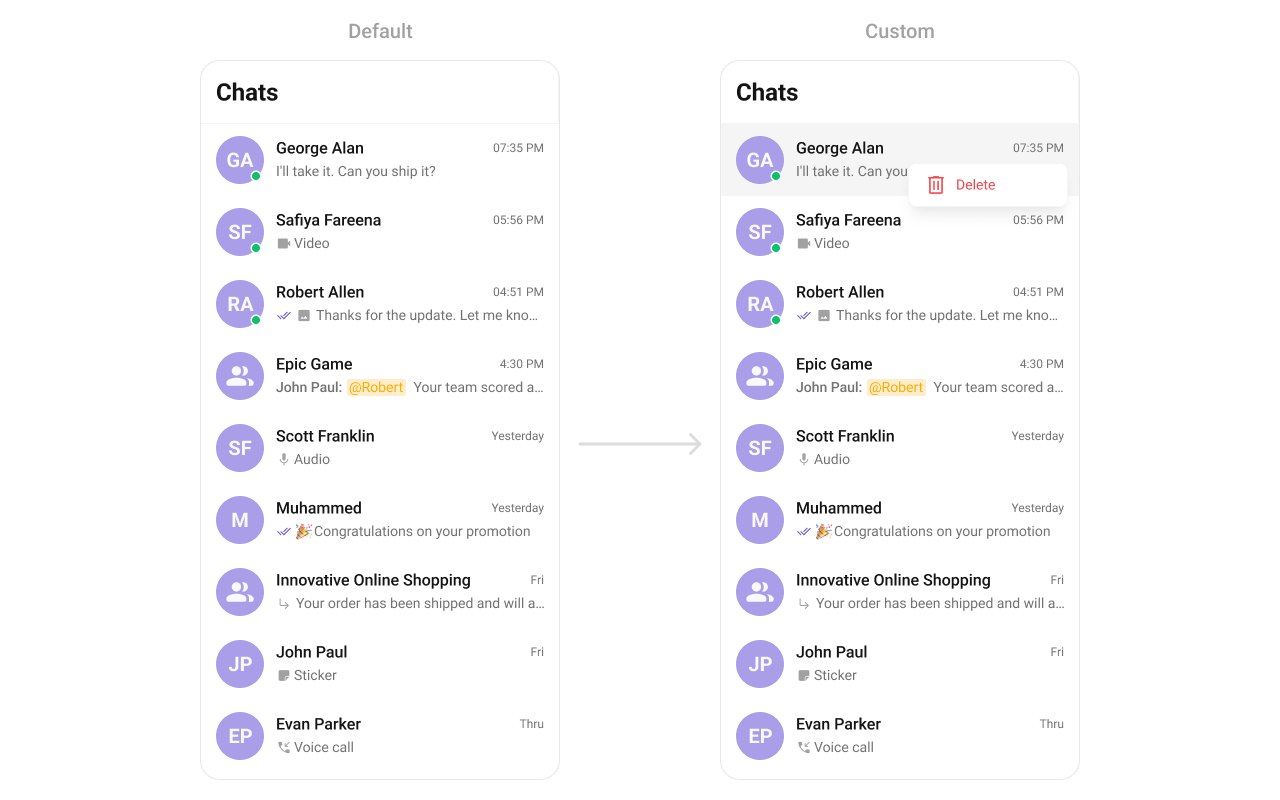
- Kotlin
- Java
cometchatConversations.setOptions { context, conversation ->
val optionsArrayList: MutableList<CometChatPopupMenu.MenuItem> =
ArrayList()
optionsArrayList.add(
CometChatPopupMenu.MenuItem(
UIKitConstants.ConversationOption.DELETE,
"Delete",
ResourcesCompat. getDrawable(resources,com.cometchat.chatuikit.R.drawable.cometchat_ic_delete, getContext()?.theme),
null,
CometChatTheme.getErrorColor(context),
0,
CometChatTheme.getErrorColor(context),
CometChatTheme.getTextAppearanceBodyRegular(context)
) {
Toast.makeText(context, "Delete", Toast.LENGTH_SHORT).show()
}
)
optionsArrayList
}
cometchatConversations.setOptions((context, conversation) -> {
List<CometChatPopupMenu.MenuItem> optionsArrayList = new ArrayList<>();
optionsArrayList.add(new CometChatPopupMenu.MenuItem(UIKitConstants.ConversationOption.DELETE,
"Delete",
getResources().getDrawable(com.cometchat.chatuikit.R.drawable.cometchat_ic_delete),
null,
CometChatTheme.getErrorColor(context),
0,
CometChatTheme.getErrorColor(context),
CometChatTheme.getTextAppearanceBodyRegular(context),
() -> {
Toast.makeText(context, "Delete", Toast.LENGTH_SHORT).show();
}));
return optionsArrayList;
});
addOptions
Append to the long-press context menu without removing defaults.
Generic signature:
- Kotlin
- Java
cometchatConversations.addOptions { context, conversation -> emptyList<CometChatPopupMenu.MenuItem?>() }
cometchatConversations.addOptions((context, conversation) -> Collections.emptyList());
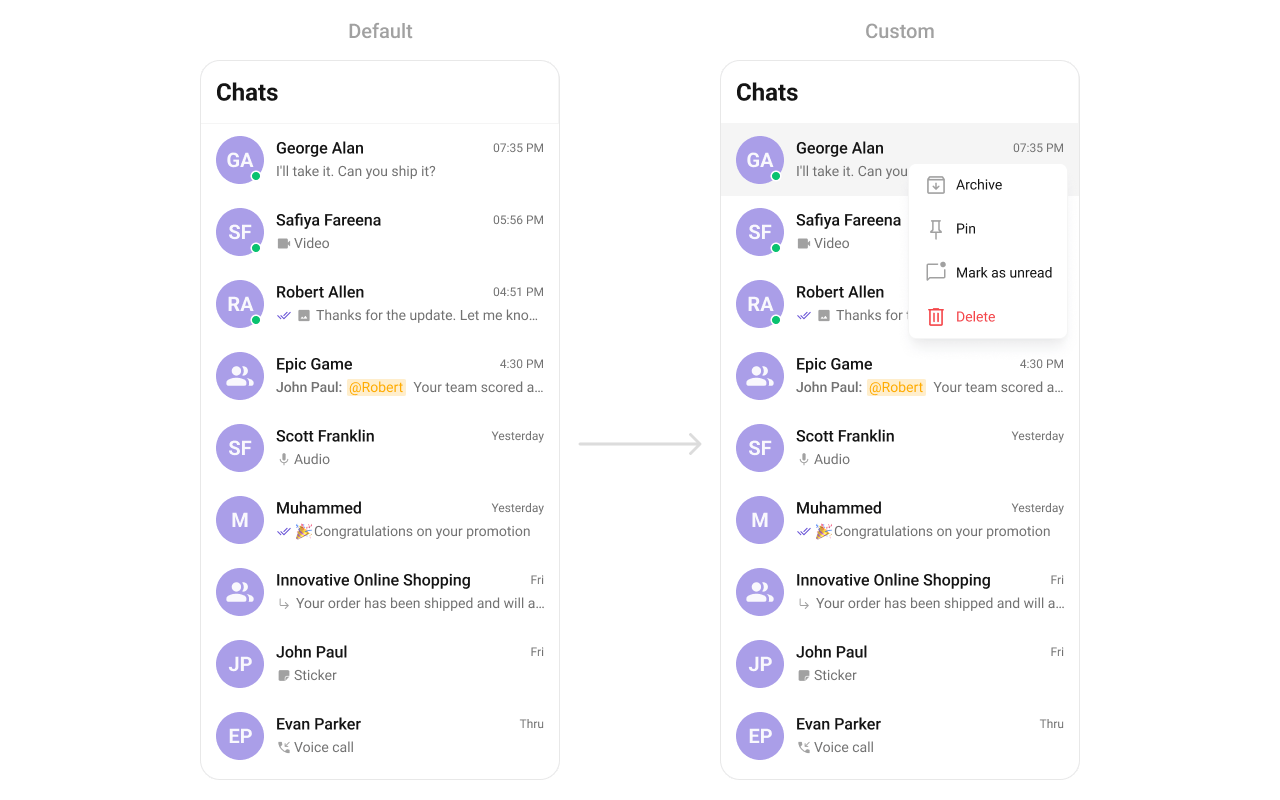
- Kotlin
- Java
cometchatConversations.addOptions { context, conversation ->
val optionsArrayList: MutableList<CometChatPopupMenu.MenuItem> = ArrayList()
optionsArrayList.add(
CometChatPopupMenu.MenuItem(
"ARCHIVE", "Archive",
resources.getDrawable(R.drawable.archive), null,
CometChatTheme.getTextColorPrimary(context), 0,
CometChatTheme.getTextColorPrimary(context),
CometChatTheme.getTextAppearanceBodyRegular(context)
) { Toast.makeText(context, "Archive", Toast.LENGTH_SHORT).show() }
)
optionsArrayList.add(
CometChatPopupMenu.MenuItem(
"PIN", "Pin",
resources.getDrawable(R.drawable.pin), null,
CometChatTheme.getTextColorPrimary(context), 0,
CometChatTheme.getTextColorPrimary(context),
CometChatTheme.getTextAppearanceBodyRegular(context)
) { Toast.makeText(context, "Pin", Toast.LENGTH_SHORT).show() }
)
optionsArrayList.add(
CometChatPopupMenu.MenuItem(
"MARKASREAD", "Mark as read",
resources.getDrawable(R.drawable.mark_as_read), null,
CometChatTheme.getTextColorPrimary(context), 0,
CometChatTheme.getTextColorPrimary(context),
CometChatTheme.getTextAppearanceBodyRegular(context)
) { Toast.makeText(context, "Mark as read", Toast.LENGTH_SHORT).show() }
)
optionsArrayList
}
cometchatConversations.addOptions((context, conversation) -> {
List<CometChatPopupMenu.MenuItem> optionsArrayList = new ArrayList<>();
optionsArrayList.add(new CometChatPopupMenu.MenuItem("ARCHIVE",
"Archive",
getResources().getDrawable(R.drawable.archive),
null,
CometChatTheme.getTextColorPrimary(context),
0,
CometChatTheme.getTextColorPrimary(context),
CometChatTheme.getTextAppearanceBodyRegular(context),
() -> Toast.makeText(context, "Archive", Toast.LENGTH_SHORT).show()));
optionsArrayList.add(new CometChatPopupMenu.MenuItem("PIN",
"Pin",
getResources().getDrawable(R.drawable.pin),
null,
CometChatTheme.getTextColorPrimary(context),
0,
CometChatTheme.getTextColorPrimary(context),
CometChatTheme.getTextAppearanceBodyRegular(context),
() -> Toast.makeText(context, "Pin", Toast.LENGTH_SHORT).show()));
optionsArrayList.add(new CometChatPopupMenu.MenuItem("MARKASREAD",
"Mark as read",
getResources().getDrawable(R.drawable.mark_as_read),
null,
CometChatTheme.getTextColorPrimary(context),
0,
CometChatTheme.getTextColorPrimary(context),
CometChatTheme.getTextAppearanceBodyRegular(context),
() -> Toast.makeText(context, "Mark as read", Toast.LENGTH_SHORT).show()));
return optionsArrayList;
});
setTextFormatters
Custom text formatters for the conversation subtitle. See the MentionsFormatter Guide for details.
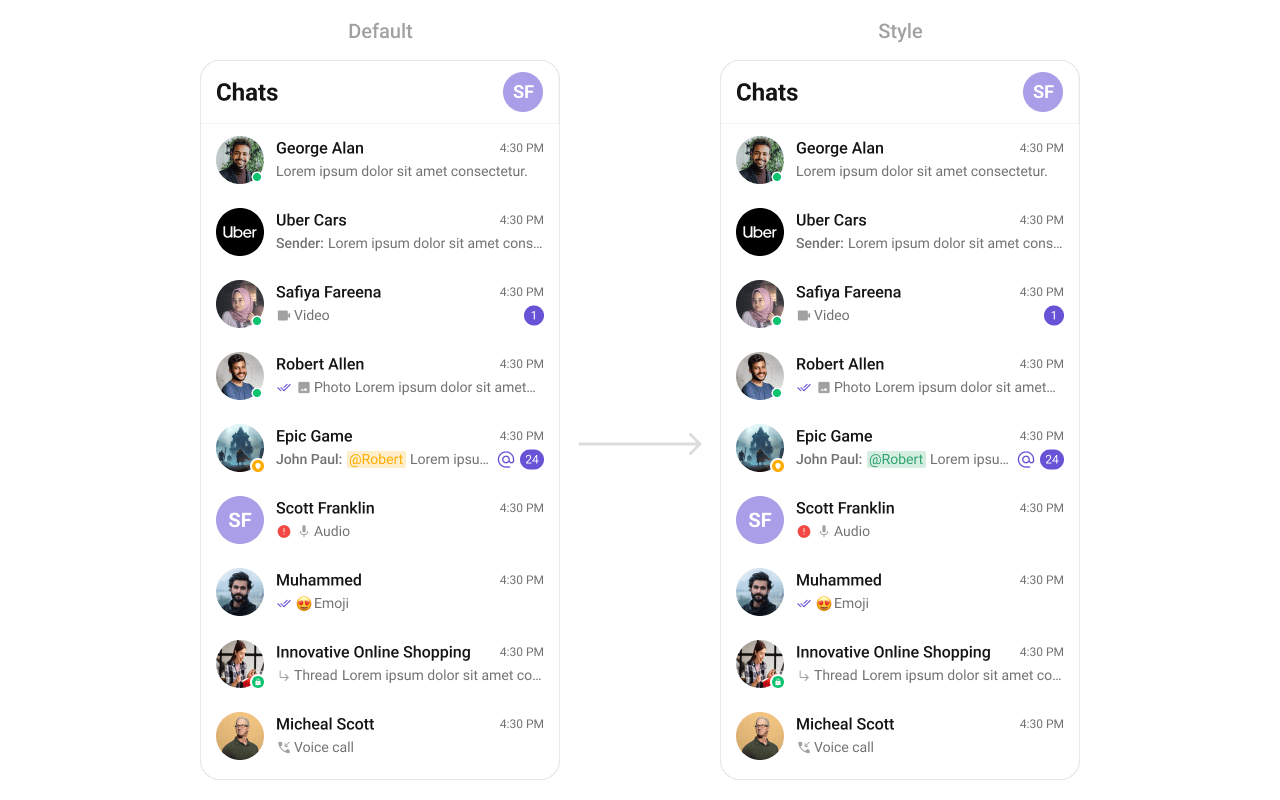
themes.xml
<style name="CustomConversationsMentionsStyle" parent="CometChatConversationsMentionsStyle">
<item name="cometchatMentionTextAppearance">?attr/cometchatTextAppearanceBodyRegular</item>
<item name="cometchatMentionTextColor">#D6409F</item>
<item name="cometchatMentionBackgroundColor">#D6409F</item>
<item name="cometchatSelfMentionTextColor">#30A46C</item>
<item name="cometchatSelfMentionTextAppearance">?attr/cometchatTextAppearanceBodyRegular</item>
<item name="cometchatSelfMentionBackgroundColor">#30A46C</item>
</style>
- Kotlin
- Java
val mentionFormatter = CometChatMentionsFormatter(context)
mentionFormatter.setConversationsMentionTextStyle(context, R.style.CustomConversationsMentionsStyle)
val textFormatters: MutableList<CometChatTextFormatter> = ArrayList()
textFormatters.add(mentionFormatter)
cometChatConversations.setTextFormatters(textFormatters)
CometChatMentionsFormatter mentionFormatter = new CometChatMentionsFormatter(context);
mentionFormatter.setConversationsMentionTextStyle(context, R.style.CustomConversationsMentionsStyle);
List<CometChatTextFormatter> textFormatters = new ArrayList<>();
textFormatters.add(mentionFormatter);
cometChatConversations.setTextFormatters(textFormatters);
setLoadingView
Sets a custom loading view displayed when data is being fetched.
- Kotlin
- Java
cometchatConversations.loadingView = R.layout.your_loading_view
cometchatConversations.setLoadingView(R.layout.your_loading_view);
What this does: Replaces the default loading spinner with your custom layout resource. The custom view displays while conversations are being fetched.
setEmptyView
Configures a custom view displayed when there are no conversations in the list.
- Kotlin
- Java
cometchatConversations.emptyView = R.layout.your_empty_view
cometchatConversations.setEmptyView(R.layout.your_empty_view);
What this does: Replaces the default empty state with your custom layout resource. The custom view displays when the conversation list has no items.
setErrorView
Defines a custom error state view that appears when an issue occurs while loading conversations.
- Kotlin
- Java
cometchatConversations.errorView = R.layout.your_error_view
cometchatConversations.setErrorView(R.layout.your_error_view);
What this does: Replaces the default error state with your custom layout resource. The custom view displays when the component encounters an error during data fetching.
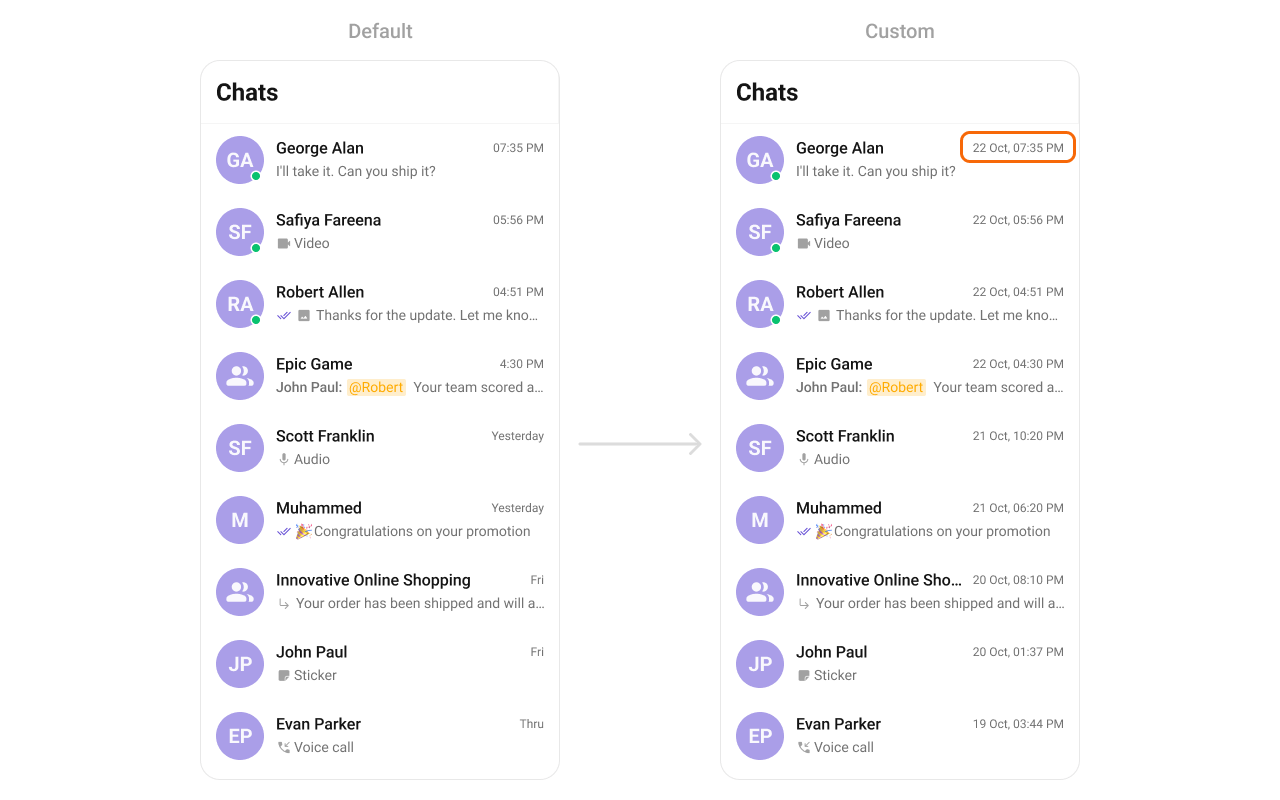
setDateFormat
Customizes the date format used for displaying timestamps in conversations.
Generic signature:
- Kotlin
- Java
cometChatConversations.setDateFormat(SimpleDateFormat)
cometChatConversations.setDateFormat(SimpleDateFormat);
- Kotlin
- Java
cometchatConversations.setDateFormat(SimpleDateFormat("dd MMM, hh:mm a",Locale.getDefault()))
cometchatConversations.setDateFormat(new SimpleDateFormat("dd MMM, hh:mm a",Locale.getDefault()));
What this does: Sets the conversation date format to “dd MMM, hh:mm a” (e.g., “10 Jul, 02:30 PM”) using the device’s default locale.
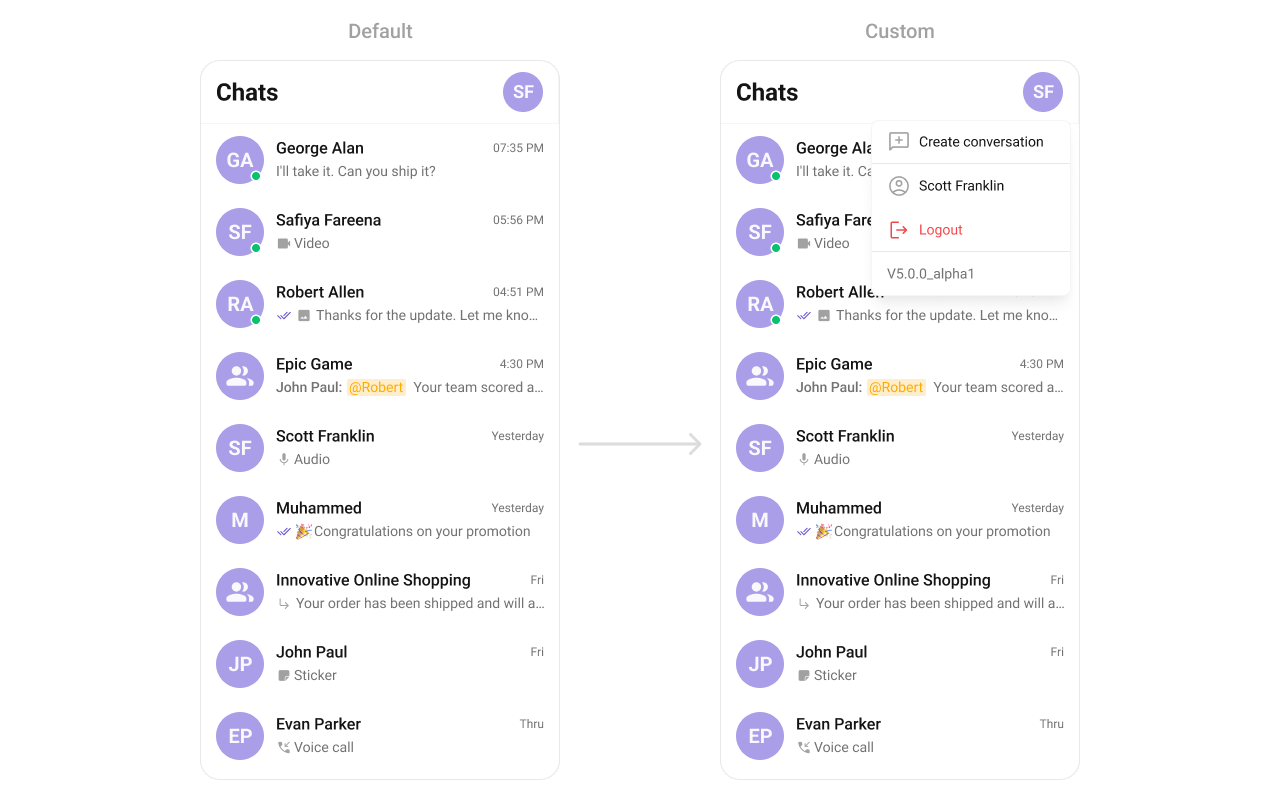
setOverflowMenu
Replace the toolbar overflow menu.
Generic signature:
- Kotlin
- Java
cometChatConversations.setOverflowMenu(view)
cometChatConversations.setOverflowMenu(View v);
user_profile_popup_menu_layout.xml custom view file:
user_profile_popup_menu_layout.xml
<?xml version="1.0" encoding="utf-8"?>
<com.google.android.material.card.MaterialCardView xmlns:android="http://schemas.android.com/apk/res/android"
xmlns:app="http://schemas.android.com/apk/res-auto"
android:layout_width="@dimen/cometchat_30dp"
android:layout_height="wrap_content"
android:layout_gravity="end"
android:layout_marginTop="@dimen/cometchat_margin_10"
android:background="?attr/cometchatBackgroundColor1"
android:padding="@dimen/cometchat_padding_2"
app:cardCornerRadius="@dimen/cometchat_radius_2"
app:strokeColor="?attr/cometchatStrokeColorDefault"
app:strokeWidth="@dimen/cometchat_1dp">
<LinearLayout
android:layout_width="match_parent"
android:layout_height="wrap_content"
android:orientation="vertical">
<TextView
android:id="@+id/tv_create_conversation"
android:layout_width="match_parent"
android:layout_height="wrap_content"
android:drawablePadding="@dimen/cometchat_padding_2"
android:gravity="center_vertical"
android:padding="@dimen/cometchat_padding_4"
android:text="@string/app_create_conversation"
android:textAppearance="?attr/textAppearanceSubtitle1"
app:drawableStartCompat="@drawable/ic_start_conversation" />
<View
android:id="@+id/view_separator"
android:layout_width="match_parent"
android:layout_height="@dimen/cometchat_1dp"
android:layout_gravity="center"
android:background="?attr/cometchatStrokeColorDefault" />
<TextView
android:id="@+id/tv_user_name"
style="?attr/cometchatTextAppearanceBodyRegular"
android:layout_width="match_parent"
android:layout_height="wrap_content"
android:drawablePadding="@dimen/cometchat_padding_2"
android:gravity="center_vertical"
android:paddingStart="@dimen/cometchat_padding_4"
android:paddingTop="@dimen/cometchat_padding_2"
android:paddingEnd="@dimen/cometchat_padding_4"
android:paddingBottom="@dimen/cometchat_padding_2"
android:textAppearance="?attr/textAppearanceSubtitle1"
android:textColor="?attr/cometchatTextColorPrimary"
app:drawableStartCompat="@drawable/ic_user_profile" />
<TextView
android:id="@+id/tv_logout"
style="?attr/cometchatTextAppearanceBodyRegular"
android:layout_width="wrap_content"
android:layout_height="wrap_content"
android:drawablePadding="@dimen/cometchat_padding_2"
android:gravity="center_vertical"
android:paddingStart="@dimen/cometchat_padding_4"
android:paddingTop="@dimen/cometchat_padding_2"
android:paddingEnd="@dimen/cometchat_padding_4"
android:paddingBottom="@dimen/cometchat_padding_2"
android:text="@string/app_logout"
android:textAppearance="?attr/textAppearanceSubtitle1"
android:textColor="?attr/cometchatErrorColor"
app:drawableStartCompat="@drawable/ic_logout" />
<View
android:layout_width="match_parent"
android:layout_height="@dimen/cometchat_1dp"
android:layout_gravity="center"
android:background="?attr/cometchatStrokeColorDefault" />
<TextView
android:id="@+id/tv_version"
style="?attr/cometchatTextAppearanceBodyRegular"
android:layout_width="match_parent"
android:layout_height="wrap_content"
android:gravity="center_vertical"
android:padding="@dimen/cometchat_padding_4"
android:textAppearance="?attr/textAppearanceCaption"
android:textColor="?attr/cometchatTextColorSecondary" />
</LinearLayout>
</com.google.android.material.card.MaterialCardView>
What this does: Defines a popup menu layout with options for creating a conversation, viewing the user profile, logging out, and displaying the app version.Inflate the view and pass it to
setOverflowMenu:
- Kotlin
- Java
class YourActivity : AppCompatActivity() {
private lateinit var cometChatConversations: CometChatConversations
override fun onCreate(savedInstanceState: Bundle?) {
super.onCreate(savedInstanceState)
setContentView(R.layout.activity_main)
cometChatConversations = findViewById(R.id.conversations)
cometChatConversations.setOverflowMenu(logoutView)
}
private val logoutView: View?
get() {
val user = CometChatUIKit.getLoggedInUser()
if (user != null) {
val cometchatAvatar = CometChatAvatar(this)
cometchatAvatar.setAvatar(user.name, user.avatar)
val layoutParams = LinearLayout.LayoutParams(
resources.getDimensionPixelSize(com.cometchat.chatuikit.R.dimen.cometchat_40dp),
resources.getDimensionPixelSize(com.cometchat.chatuikit.R.dimen.cometchat_40dp))
layoutParams.layoutDirection = Gravity.CENTER_VERTICAL
cometchatAvatar.layoutParams = layoutParams
cometchatAvatar.setOnClickListener {
showCustomMenu(cometChatConversations.binding.toolbarLayout)
}
return cometchatAvatar
}
return null
}
private fun showCustomMenu(anchorView: View) {
val popupMenuBinding = UserProfilePopupMenuLayoutBinding.inflate(LayoutInflater.from(this))
val popupWindow = PopupWindow(popupMenuBinding.root,
resources.getDimensionPixelSize(com.cometchat.chatuikit.R.dimen.cometchat_250dp),
LinearLayout.LayoutParams.WRAP_CONTENT, true)
popupMenuBinding.tvUserName.text = CometChatUIKit.getLoggedInUser().name
val version = "V" + BuildConfig.VERSION_NAME + "(" + BuildConfig.VERSION_CODE + ")"
popupMenuBinding.tvVersion.text = version
popupMenuBinding.tvCreateConversation.setOnClickListener { popupWindow.dismiss() }
popupMenuBinding.tvUserName.setOnClickListener { popupWindow.dismiss() }
popupMenuBinding.tvLogout.setOnClickListener { popupWindow.dismiss() }
popupWindow.elevation = 5f
val endMargin = resources.getDimensionPixelSize(com.cometchat.chatuikit.R.dimen.cometchat_margin_2)
val anchorWidth = anchorView.width
val offsetX = anchorWidth - popupWindow.width - endMargin
popupWindow.showAsDropDown(anchorView, offsetX, 0)
}
}
public class YourActivity extends AppCompatActivity {
private CometChatConversations cometChatConversations;
@Override
protected void onCreate(Bundle savedInstanceState) {
super.onCreate(savedInstanceState);
setContentView(R.layout.activity_main);
cometChatConversations = findViewById(R.id.conversations);
cometChatConversations.setOverflowMenu(getLogoutView());
}
private View getLogoutView() {
User user = CometChatUIKit.getLoggedInUser();
if (user != null) {
CometChatAvatar cometchatAvatar = new CometChatAvatar(this);
cometchatAvatar.setAvatar(user.getName(), user.getAvatar());
LinearLayout.LayoutParams layoutParams = new LinearLayout.LayoutParams(
getResources().getDimensionPixelSize(com.cometchat.chatuikit.R.dimen.cometchat_40dp),
getResources().getDimensionPixelSize(com.cometchat.chatuikit.R.dimen.cometchat_40dp));
layoutParams.setLayoutDirection(Gravity.CENTER_VERTICAL);
cometchatAvatar.setLayoutParams(layoutParams);
cometchatAvatar.setOnClickListener(v -> {
showCustomMenu(cometChatConversations.getBinding().toolbarLayout);
});
return cometchatAvatar;
}
return null;
}
private void showCustomMenu(View anchorView) {
UserProfilePopupMenuLayoutBinding popupMenuBinding = UserProfilePopupMenuLayoutBinding.inflate(LayoutInflater.from(this));
final PopupWindow popupWindow = new PopupWindow(popupMenuBinding.getRoot(),
getResources().getDimensionPixelSize(com.cometchat.chatuikit.R.dimen.cometchat_250dp),
LinearLayout.LayoutParams.WRAP_CONTENT, true);
popupMenuBinding.tvUserName.setText(CometChatUIKit.getLoggedInUser().getName());
String version = "V" + BuildConfig.VERSION_NAME + "(" + BuildConfig.VERSION_CODE + ")";
popupMenuBinding.tvVersion.setText(version);
popupMenuBinding.tvCreateConversation.setOnClickListener(view -> popupWindow.dismiss());
popupMenuBinding.tvUserName.setOnClickListener(view -> popupWindow.dismiss());
popupMenuBinding.tvLogout.setOnClickListener(view -> popupWindow.dismiss());
popupWindow.setElevation(5);
int endMargin = getResources().getDimensionPixelSize(com.cometchat.chatuikit.R.dimen.cometchat_margin_2);
int anchorWidth = anchorView.getWidth();
int offsetX = anchorWidth - popupWindow.getWidth() - endMargin;
popupWindow.showAsDropDown(anchorView, offsetX, 0);
}
}
What this does: Creates a complete overflow menu implementation. An avatar of the logged-in user is set as the overflow menu view. When tapped, it shows a popup window with options for creating a conversation, viewing the user profile, logging out, and displaying the app version.
- Verify: After setting any custom view slot, confirm the custom view renders in the correct position within the conversation list item, and the data binding populates correctly for each conversation.
Common Patterns
Custom empty state with action button
layout/empty_conversations.xml
<?xml version="1.0" encoding="utf-8"?>
<LinearLayout xmlns:android="http://schemas.android.com/apk/res/android"
android:layout_width="match_parent"
android:layout_height="match_parent"
android:gravity="center"
android:orientation="vertical"
android:padding="40dp">
<TextView
android:layout_width="wrap_content"
android:layout_height="wrap_content"
android:text="No conversations yet"
android:textAppearance="?attr/cometchatTextAppearanceHeading3Bold" />
<Button
android:id="@+id/btn_start_chat"
android:layout_width="wrap_content"
android:layout_height="wrap_content"
android:layout_marginTop="16dp"
android:text="Start a conversation" />
</LinearLayout>
- Kotlin
- Java
cometChatConversations.emptyView = R.layout.empty_conversations
cometChatConversations.setEmptyView(R.layout.empty_conversations);
Hide all chrome — minimal list
- Kotlin
- Java
cometChatConversations.setReceiptsVisibility(View.GONE)
cometChatConversations.setUserStatusVisibility(View.GONE)
cometChatConversations.setGroupTypeVisibility(View.GONE)
cometChatConversations.setDeleteConversationOptionVisibility(View.GONE)
cometChatConversations.setToolbarVisibility(View.GONE)
cometChatConversations.setReceiptsVisibility(View.GONE);
cometChatConversations.setUserStatusVisibility(View.GONE);
cometChatConversations.setGroupTypeVisibility(View.GONE);
cometChatConversations.setDeleteConversationOptionVisibility(View.GONE);
cometChatConversations.setToolbarVisibility(View.GONE);
Filter to user conversations only
- Kotlin
- Java
val builder = ConversationsRequest.ConversationsRequestBuilder()
.setConversationType(CometChatConstants.CONVERSATION_TYPE_USER)
cometChatConversations.setConversationsRequestBuilder(builder)
ConversationsRequest.ConversationsRequestBuilder builder = new ConversationsRequest.ConversationsRequestBuilder();
builder.setConversationType(CometChatConstants.CONVERSATION_TYPE_USER);
cometChatConversations.setConversationsRequestBuilder(builder);
Advanced Methods
Programmatic Selection
selectConversation
Programmatically selects or deselects a conversation. Works with both SINGLE and MULTIPLE selection modes.
- Kotlin
- Java
// Select a conversation in single-select mode
cometChatConversations.selectConversation(conversation, UIKitConstants.SelectionMode.SINGLE)
// Select a conversation in multi-select mode
cometChatConversations.selectConversation(conversation, UIKitConstants.SelectionMode.MULTIPLE)
// Select a conversation in single-select mode
cometChatConversations.selectConversation(conversation, UIKitConstants.SelectionMode.SINGLE);
// Select a conversation in multi-select mode
cometChatConversations.selectConversation(conversation, UIKitConstants.SelectionMode.MULTIPLE);
InSINGLEmode, selecting a new conversation replaces the previous selection. InMULTIPLEmode, calling this on an already-selected conversation deselects it (toggle behavior).
clearSelection
Clears all selected conversations and resets the selection UI.
- Kotlin
- Java
cometChatConversations.clearSelection()
cometChatConversations.clearSelection();
getSelectedConversations
Returns the list of currently selected Conversation objects.
- Kotlin
- Java
val selected = cometChatConversations.selectedConversations
List<Conversation> selected = cometChatConversations.getSelectedConversations();
Selected Conversations List
When using multi-select mode, a horizontal list of selected conversations can be shown above the main list.| Method | Type | Description |
|---|---|---|
setSelectedConversationsListVisibility | int (View.VISIBLE / View.GONE) | Show or hide the selected conversations strip |
setSelectedConversationAvatarStyle | @StyleRes int | Avatar style for selected conversation chips |
setSelectedConversationItemTextColor | @ColorInt int | Text color for selected conversation names |
setSelectedConversationItemTextAppearance | @StyleRes int | Text appearance for selected conversation names |
setSelectedConversationItemRemoveIcon | Drawable | Icon for the remove button on each chip |
setSelectedConversationItemRemoveIconTint | @ColorInt int | Tint color for the remove icon |
Search Input Customization
The built-in search box can be customized programmatically:| Method | Type | Description |
|---|---|---|
setSearchInputText | String | Sets the search input text programmatically |
setSearchPlaceholderText | String | Sets the placeholder text for the search input |
setSearchInputTextColor | @ColorInt int | Text color of the search input |
setSearchInputTextAppearance | @StyleRes int | Text appearance of the search input |
setSearchInputPlaceHolderTextColor | @ColorInt int | Placeholder text color |
setSearchInputPlaceHolderTextAppearance | @StyleRes int | Placeholder text appearance |
setSearchInputStartIcon | Drawable | Leading icon in the search box |
setSearchInputStartIconTint | @ColorInt int | Tint for the leading icon |
setSearchInputEndIcon | Drawable | Trailing icon in the search box |
setSearchInputEndIconTint | @ColorInt int | Tint for the trailing icon |
setSearchInputEndIconVisibility | int | Visibility of the trailing icon |
setSearchInputStrokeWidth | @Dimension int | Stroke width of the search box border |
setSearchInputStrokeColor | @ColorInt int | Stroke color of the search box border |
setSearchInputBackgroundColor | @ColorInt int | Background color of the search box |
setSearchInputCornerRadius | @Dimension int | Corner radius of the search box |
Internal Access
These methods provide direct access to internal components for advanced use cases.| Method | Returns | Description |
|---|---|---|
getRecyclerView() | RecyclerView | The underlying RecyclerView displaying conversations |
getViewModel() | ConversationsViewModel | The ViewModel managing conversation data and state |
getConversationsAdapter() | ConversationsAdapter | The adapter powering the RecyclerView |
setAdapter(ConversationsAdapter) | void | Replaces the default adapter with a custom one |
getBinding() | CometchatConversationsListViewBinding | The ViewBinding for the component’s root layout |
Use these only when the standard API is insufficient. Directly manipulating the adapter or ViewModel may conflict with the component’s internal state management.
Other Methods
| Method | Type | Description |
|---|---|---|
setMentionAllLabelId(String id, String mentionAllLabel) | void | Sets the label used for “mention all” in conversation subtitles |
setDateStyle(@StyleRes int) | void | Sets the style for the date label in conversation items |
setOptionListStyle(@StyleRes int) | void | Sets the style for the long-press popup menu |
Style
The component uses XML theme styles. Define a custom style with parentCometChatConversationsStyle in themes.xml, then apply with setStyle().
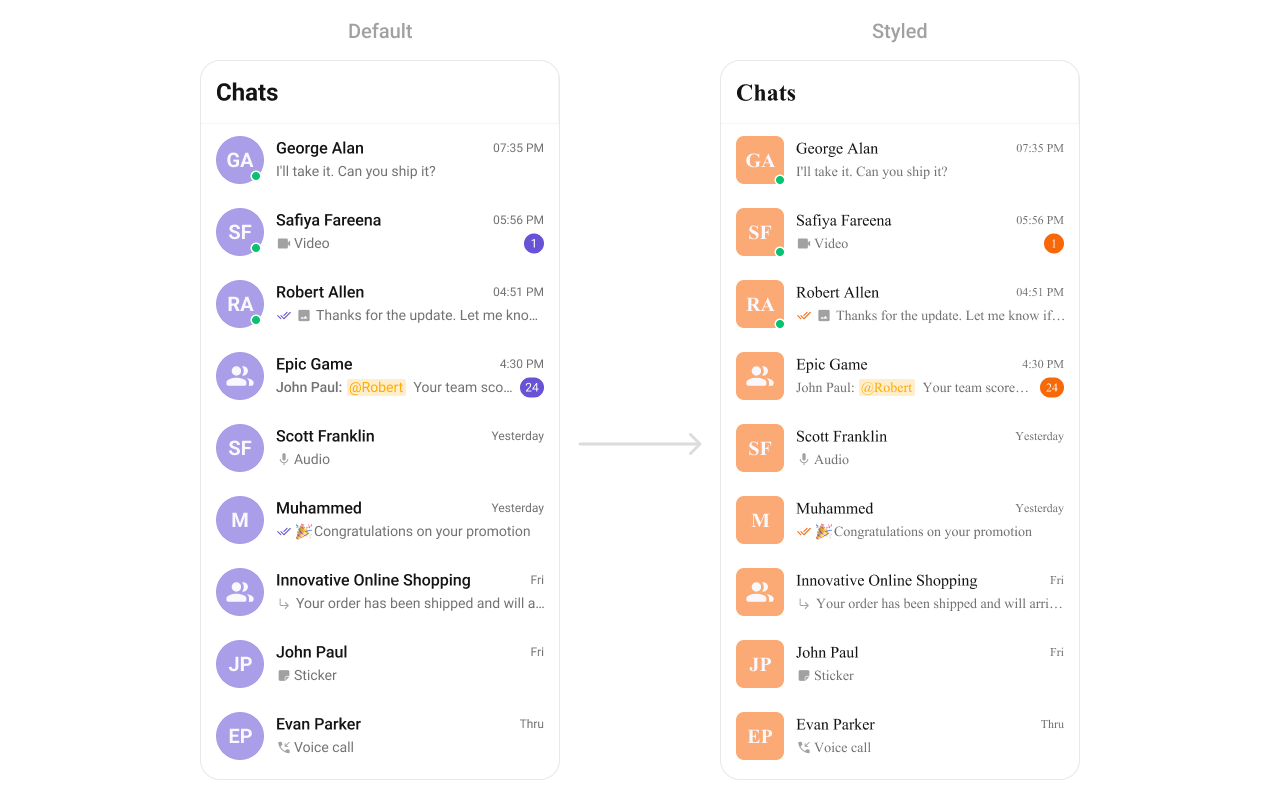
themes.xml
<style name="CustomAvatarStyle" parent="CometChatAvatarStyle">
<item name="cometchatAvatarStrokeRadius">8dp</item>
<item name="cometchatAvatarBackgroundColor">#FBAA75</item>
</style>
<style name="CustomBadgeCountStyle" parent="CometChatBadgeStyle">
<item name="cometchatBadgeBackgroundColor">#F76808</item>
<item name="cometchatBadgeTextColor">#FFFFFF</item>
</style>
<style name="CustomConversationsStyle" parent="CometChatConversationsStyle">
<item name="cometchatConversationsAvatarStyle">@style/CustomAvatarStyle</item>
<item name="cometchatConversationsBadgeStyle">@style/CustomBadgeCountStyle</item>
</style>
- Kotlin
- Java
cometChatConversations.setStyle(R.style.CustomConversationsStyle)
cometChatConversations.setStyle(R.style.CustomConversationsStyle);
Programmatic Style Properties
In addition to XML theme styles, the component exposes programmatic setters for fine-grained control:| Method | Type | Description |
|---|---|---|
setBackgroundColor | @ColorInt int | Background color of the component |
setBackIconTint | @ColorInt int | Tint color for the back icon |
setBackIcon | Drawable | Custom back icon drawable |
setTitleTextColor | @ColorInt int | Title text color in the toolbar |
setTitleTextAppearance | @StyleRes int | Title text appearance in the toolbar |
setItemTitleTextColor | @ColorInt int | Text color for conversation item titles |
setItemTitleTextAppearance | @StyleRes int | Text appearance for conversation item titles |
setItemSubtitleTextColor | @ColorInt int | Text color for conversation item subtitles |
setItemSubtitleTextAppearance | @StyleRes int | Text appearance for conversation item subtitles |
setItemMessageTypeIconTint | @ColorInt int | Tint for message type icons in subtitles |
setSeparatorColor | @ColorInt int | Color of list item separators |
setSeparatorHeight | @Dimension int | Height of list item separators |
setStrokeColor | @ColorInt int | Stroke color of the component border |
setStrokeWidth | @Dimension int | Stroke width of the component border |
setCornerRadius | @Dimension int | Corner radius of the component |
setEmptyStateTitleTextColor | @ColorInt int | Title text color for the empty state |
setEmptyStateSubtitleTextColor | @ColorInt int | Subtitle text color for the empty state |
setEmptyStateTextTitleAppearance | @StyleRes int | Title text appearance for the empty state |
setEmptyStateTextSubtitleAppearance | @StyleRes int | Subtitle text appearance for the empty state |
setErrorStateTitleTextColor | @ColorInt int | Title text color for the error state |
setErrorStateSubtitleTextColor | @ColorInt int | Subtitle text color for the error state |
setErrorStateTextTitleAppearance | @StyleRes int | Title text appearance for the error state |
setErrorStateTextSubtitleAppearance | @StyleRes int | Subtitle text appearance for the error state |
setDeleteOptionIcon | Drawable | Icon for the delete option in the context menu |
setDeleteOptionIconTint | int | Tint for the delete option icon |
setDeleteOptionTextColor | int | Text color for the delete option |
setDeleteOptionTextAppearance | int | Text appearance for the delete option |
setAvatarStyle | @StyleRes int | Style for conversation avatars |
setStatusIndicatorStyle | @StyleRes int | Style for online/offline status indicators |
setBadgeStyle | @StyleRes int | Style for unread badge counts |
setReceiptStyle | @StyleRes int | Style for read/delivered receipt icons |
setTypingIndicatorStyle | @StyleRes int | Style for typing indicator text |
setMentionsStyle | @StyleRes int | Style for @mention text in subtitles |
setItemBackgroundColor | @ColorInt int | Background color for list items |
setItemSelectedBackgroundColor | @ColorInt int | Background color for selected list items |
Checkbox Style Properties (Selection Mode)
When usingSINGLE or MULTIPLE selection mode, checkboxes appear on each item:
| Method | Type | Description |
|---|---|---|
setCheckBoxStrokeWidth | @Dimension int | Stroke width of the checkbox border |
setCheckBoxCornerRadius | @Dimension int | Corner radius of the checkbox |
setCheckBoxStrokeColor | @ColorInt int | Stroke color of the checkbox border |
setCheckBoxBackgroundColor | @ColorInt int | Background color of unchecked checkbox |
setCheckBoxCheckedBackgroundColor | @ColorInt int | Background color of checked checkbox |
setCheckBoxSelectIcon | Drawable | Icon shown when checkbox is checked |
setCheckBoxSelectIconTint | @ColorInt int | Tint for the checkbox select icon |
setDiscardSelectionIcon | Drawable | Icon for the discard selection button |
setDiscardSelectionIconTint | @ColorInt int | Tint for the discard selection icon |
setSubmitSelectionIcon | Drawable | Icon for the submit selection button |
setSubmitSelectionIconTint | @ColorInt int | Tint for the submit selection icon |
Customization Matrix
| What to change | Where | Property/API | Example |
|---|---|---|---|
| Override behavior on user interaction | Activity/Fragment | setOn<Event> callbacks | setOnItemClick((v, pos, c) -> { ... }) |
| Filter which conversations appear | Activity/Fragment | setConversationsRequestBuilder | setConversationsRequestBuilder(builder) |
| Toggle visibility of UI elements | Activity/Fragment | set<Feature>Visibility(int) | setReceiptsVisibility(View.GONE) |
| Replace a section of the list item | Activity/Fragment | set<Slot>View | setLeadingView(listener) |
| Change colors, fonts, spacing | themes.xml | CometChatConversationsStyle | <item name="cometchatConversationsBadgeStyle">@style/...</item> |
| Avatar style (corner radius, background) | themes.xml | cometchatConversationsAvatarStyle | <item name="cometchatAvatarStrokeRadius">8dp</item> |
| Badge count style (background, text color) | themes.xml | cometchatConversationsBadgeStyle | <item name="cometchatBadgeBackgroundColor">#F76808</item> |
| Apply a custom style | Activity/Fragment | setStyle(int styleRes) | cometChatConversations.setStyle(R.style.CustomConversationsStyle); |
| Back button visibility | Activity/Fragment | setBackIconVisibility(int) | .setBackIconVisibility(View.VISIBLE); |
| Toolbar visibility | Activity/Fragment | setToolbarVisibility(int) | .setToolbarVisibility(View.GONE); |
| Loading state visibility | Activity/Fragment | setLoadingStateVisibility(int) | .setLoadingStateVisibility(View.GONE); |
| Delete option visibility on long press | Activity/Fragment | setDeleteConversationOptionVisibility(int) | .setDeleteConversationOptionVisibility(View.GONE); |
| Error state visibility | Activity/Fragment | setErrorStateVisibility(int) | .setErrorStateVisibility(View.GONE); |
| Empty state visibility | Activity/Fragment | setEmptyStateVisibility(int) | .setEmptyStateVisibility(View.GONE); |
| Separator visibility | Activity/Fragment | setSeparatorVisibility(int) | .setSeparatorVisibility(View.GONE); |
| User online status visibility | Activity/Fragment | setUserStatusVisibility(int) | .setUserStatusVisibility(View.GONE); |
| Group type indicator visibility | Activity/Fragment | setGroupTypeVisibility(int) | .setGroupTypeVisibility(View.GONE); |
| Read/delivered receipts visibility | Activity/Fragment | setReceiptsVisibility(int) | .setReceiptsVisibility(View.GONE); |
| Incoming message sound | Activity/Fragment | disableSoundForMessages(boolean) | .disableSoundForMessages(true); |
| Custom message sound | Activity/Fragment | setCustomSoundForMessages(int) | .setCustomSoundForMessages(R.raw.cometchat_beep2); |
| Selection mode (single/multiple) | Activity/Fragment | setSelectionMode(SelectionMode) | .setSelectionMode(UIKitConstants.SelectionMode.MULTIPLE); |
| Date/time formatting | Activity/Fragment | setDateTimeFormatter(DateTimeFormatterCallback) | See setDateTimeFormatter code above |
| Date format | Activity/Fragment | setDateFormat(SimpleDateFormat) | .setDateFormat(new SimpleDateFormat("dd MMM, hh:mm a", Locale.getDefault())); |
| Long-press options (replace) | Activity/Fragment | setOptions(Function2) | See setOptions code above |
| Long-press options (append) | Activity/Fragment | addOptions(Function2) | See addOptions code above |
| Loading view | Activity/Fragment | setLoadingView(int) | .setLoadingView(R.layout.your_loading_view); |
| Empty view | Activity/Fragment | setEmptyView(int) | .setEmptyView(R.layout.your_empty_view); |
| Error view | Activity/Fragment | setErrorView(int) | .setErrorView(R.layout.your_error_view); |
| Leading view (avatar area) | Activity/Fragment | setLeadingView(ConversationsViewHolderListener) | See setLeadingView code above |
| Title view | Activity/Fragment | setTitleView(ConversationsViewHolderListener) | See setTitleView code above |
| Trailing view | Activity/Fragment | setTrailingView(ConversationsViewHolderListener) | See setTrailingView code above |
| Entire list item | Activity/Fragment | setItemView(ConversationsViewHolderListener) | See setItemView code above |
| Subtitle view | Activity/Fragment | setSubtitleView(ConversationsViewHolderListener) | See setSubtitleView code above |
| Text formatters (mentions) | Activity/Fragment | setTextFormatters(List<CometChatTextFormatter>) | See setTextFormatters code above |
| Overflow menu | Activity/Fragment | setOverflowMenu(View) | cometChatConversations.setOverflowMenu(view); |
| Filter conversations | Activity/Fragment | setConversationsRequestBuilder(ConversationsRequestBuilder) | See Filters code above |
| Search box visibility | Activity/Fragment | setSearchBoxVisibility(int) | .setSearchBoxVisibility(View.GONE); |
| Search input text | Activity/Fragment | setSearchInputText(String) | .setSearchInputText("search term"); |
| Search placeholder text | Activity/Fragment | setSearchPlaceholderText(String) | .setSearchPlaceholderText("Search..."); |
| Search input colors | Activity/Fragment | setSearchInputTextColor, setSearchInputBackgroundColor | .setSearchInputTextColor(Color.BLACK); |
| Search input icons | Activity/Fragment | setSearchInputStartIcon, setSearchInputEndIcon | .setSearchInputStartIcon(drawable); |
| Hide receipts (adapter) | Activity/Fragment | hideReceipts(boolean) | .hideReceipts(true); |
| Programmatic selection | Activity/Fragment | selectConversation(Conversation, SelectionMode) | .selectConversation(conv, SelectionMode.SINGLE); |
| Clear selection | Activity/Fragment | clearSelection() | .clearSelection(); |
| Selected conversations strip | Activity/Fragment | setSelectedConversationsListVisibility(int) | .setSelectedConversationsListVisibility(View.VISIBLE); |
| Selected conversation avatar style | Activity/Fragment | setSelectedConversationAvatarStyle(int) | .setSelectedConversationAvatarStyle(R.style.CustomAvatarStyle); |
| Internal adapter access | Activity/Fragment | getConversationsAdapter() / setAdapter() | Advanced use only |
| Internal ViewModel access | Activity/Fragment | getViewModel() | Advanced use only |
| Mention-all label | Activity/Fragment | setMentionAllLabelId(String, String) | .setMentionAllLabelId("all", "Everyone"); |
Next Steps
Users
Browse and search available users
Groups
Browse and search available groups
Message List
Display messages in a conversation
Message Composer
Rich input for sending messages